


ADD Assistant: System Monitor
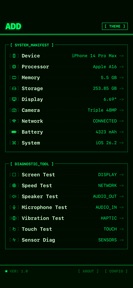


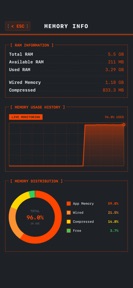

ADD Assistant is a hardware diagnostic utility for iOS that provides real-time system, sensor, and network monitoring in a local dashboard.
The App DNA
What makes this app unique?
Users open ADD Assistant to verify device specifications or identify hardware defects when purchasing second-hand hardware, avoiding the data-collection risks of cloud-based alternatives.
For Tech enthusiasts and second-hand device buyers requiring hardware verification and performance diagnostics.
What does it look like?
Key features
Aggregates device model, ID, and manufacturing data.
Interactive full-screen color tools to identify screen defects.
Hardware analysis performed entirely on-device without external data transmission.
How much does it cost?
The app is currently offered as a free utility with no visible subscription or IAP gates.
Velocity
Maintenance developmentperformanceopaqueShow more...
ADD Assistant: System Monitor currently operates on a maintenance cadence, with only one release shipped in the observed window. The latest version, released 19 days ago, contains no feature-specific information, focusing exclusively on known issues. Development appears limited to periodic stability upkeep rather than active feature expansion. There have been no major updates or new content additions identified in the recent history.
Who built it?
Beijing Idee Technology Co.
3 apps tracked · Utilities
 Anyview阅读
 Readingo
User Sentiment
What do users think recently?
Fresh user feedback skews thrilled. Users appreciate absence of intrusive advertisements allows users to focus on the core content without constant interruption.
How are ratings & reviews evolving?
What users say, by theme
- Absence of intrusive advertisements allows users to focus on the core content without constant interruption
1 of 1 recent reviews analyzed · limited sample
Read the full review analysisCompetition
Competitive landscape for ADD Assistant: System Monitor
How's the Utilities market?
ADD Assistant holds a 4.9-star rating across 22 total ratings. Its ad-free, free-to-use model creates a high-trust entry point for users seeking hardware verification tools.
Read the market outlookThe rivals identified
Unlock the deeper market read.
Access the full report for freeThe Analyst's Read
Key takeaways for ADD Assistant: System Monitor
Where is it heading?
The diagnostic utility market is consolidating around tools that offer either deep hardware-level integration or high-value resale verification. ADD Assistant is currently positioned as a high-trust, privacy-focused alternative, but its lack of feature updates leaves it vulnerable to rivals that offer more comprehensive reporting.
- The ad-free experience drives high user sentiment, which creates a strong foundation for future monetization experiments.
- The current maintenance-only release cadence suggests the developer is not actively competing for feature parity with larger diagnostic utilities.
The SWOT
- Local-only processing removes data-privacy friction
- Ad-free interface maintains user focus
- Interactive screen testing provides clear utility
- Implement a 'Pro' tier for advanced export
- Expand into device-resale valuation tools
Next best moves
Ship diagnostic log export because users require data portability for hardware verification → increase utility value
The counter-intuitive read
The lack of monetization is the app's primary asset…
Read the full takeBottom line
ADD Assistant maintains a clean, ad-free experience that satisfies the core diagnostic needs of its user base. Pivoting toward a professional-grade export feature set would unlock monetization potential without compromising the privacy-first utility that currently drives its high sentiment.
Unlock 2 critical frictions, 2 market threats and the analyst’s take.
Access the full report for freeFAQ
Is ADD Assistant safe to use for checking my device's hardware?
Does ADD Assistant have any paid features or subscriptions?
What can I use ADD Assistant for if I am buying a used phone?
Sources
- [1] App Store
Report last updated