



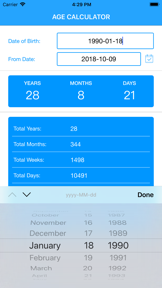
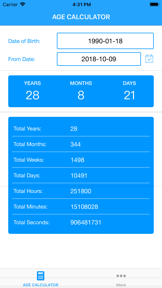

Age Calculator is a utility app for Android and iOS that performs chronological age tracking, date arithmetic, and BMI calculations.
The App DNA
What makes this app unique?
Users hire this app to perform precise, multi-unit date calculations for professional and personal record-keeping, replacing manual arithmetic with a persistent, saved-event utility.
For General users seeking a utility tool for chronological age tracking, date arithmetic, and personal event management.
What does it look like?
Key features
Calculates age in years, months, days, hours, minutes, and seconds based on birth date input.
Allows users to save family and friend birthdays or anniversaries with notification alerts.
Performs addition and subtraction of days, months, and years from specific dates.
Enables local device backup and restoration of saved event data.
Integrated health metric tool for body mass index calculation.
How much does it cost?
The app operates on a free-to-use model with no IAP or subscription gates observed.
Velocity
Dormant developmentperformanceShow more...
The Age Calculator App has not seen a release in over 7 months, placing it firmly in the zombie category based on the current date of May 2026. The last update in October 2025 was a minor technical maintenance release focused on Android API compatibility. There is no evidence of active development, feature expansion, or live operations. The development trend is stagnant.
Who built it?
Vishal Patel
11 apps tracked · Utilities
 Amount In Words
 HashBit: BTC Cloud Mining
 Patidar Vivah
 SIP Calculator App
 EMI Calculator App
 Calculator for Wood
 Stock Average Price Calculator
 GST Calculator - India
 English Vocabulary Builder
 Kids Name For all Religion
User Sentiment
What do users think recently?
Recent user voice shows a mixed sentiment. Users appreciate accurate age calculation functionality provides significant utility for professional social workers and business users and minimalist and lightweight interface design allows for quick and efficient date processing tasks, but report navigation button overlap prevents users from accessing the application interface on modern android devices.
How are ratings & reviews evolving?
What users say, by theme
- Accurate age calculation functionality provides significant utility for professional social workers and business users
- Minimalist and lightweight interface design allows for quick and efficient date processing tasks
- Navigation button overlap prevents users from accessing the application interface on modern Android devices
85 of 95 recent reviews analyzed · high confidence · Mixed overall
Read the full review analysisUnlock 1 more frustration theme and 1 user request, each backed by review evidence.
Access the full report for freeCompetition
Competitive landscape for Age Calculator App
How's the Utilities market?
The app maintains a 4.5-star rating across 11,801 total ratings, positioning it as a reliable utility despite recent UI regressions. The lack of a paid tier limits revenue capture from the professional user segment that relies on its core calculation accuracy.
Read the market outlookThe rivals identified
Unlock the deeper market read.
Access the full report for freeThe Analyst's Read
Key takeaways for Age Calculator App
Where is it heading?
Users report: The utility market is consolidating around tools that offer higher input speed and data persistence, leaving this app exposed. Maintenance-mode updates that fail to address navigation regressions will erode the professional user base before a paid monetization model can be implemented.
- Critical UI regressions on Android (navigation button overlap) prevent access, which directly accelerates churn among the professional user base.
- Intrusive, loud video advertisements during calculation tasks drive negative sentiment, which compounds the rating drag already visible on the platform.
The SWOT
- High-precision calculation engine sustains professional utility for social workers
- Lightweight app footprint enables rapid session starts on low-end hardware
- Introduce ad-free paid tier to convert professional power users
- Implement Google account login for cloud-based data persistence
Next best moves
Rebuild home page layout to resolve navigation button overlap on Android
+ 1 more prioritized moveThe counter-intuitive read
The app's reliance on intrusive ads is not…
Read the full takeFeature gaps
Gesture-based input management (available in Quick Percents) +2
Since the last report: The app's competitive position has declined due to critical Android navigation regressions and user frustration with intrusive advertising, despite the core utility remaining stable.
Bottom line
The app provides high-utility calculation tools that professional users rely on, but critical UI regressions and intrusive ads threaten retention, so the PM should prioritize fixing the Android navigation overlap to stabilize the user base.
Unlock 3 critical frictions, 2 market threats, 1 more prioritized move and the analyst’s take.
Access the full report for freeReport last updated