


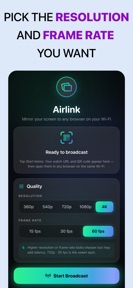


Airlink is a screen-mirroring utility for iOS that streams live device output to any web browser via local Wi-Fi.
The App DNA
What makes this app unique?
The tool removes the friction of installing receiver software on guest laptops or TVs, serving users who need to present in environments where AirPlay is blocked or unavailable.
For Professionals, educators, and students requiring mobile-to-browser screen sharing.
What does it look like?
Key features
Streams live screen content to any web browser via local Wi-Fi without requiring viewer-side software.
Routes all traffic over local Wi-Fi to ensure data remains off the cloud.
How much does it cost?
Airlink is currently offered as a free utility with no visible subscription or IAP gates.
Velocity
Maintenance developmentopaqueShow more...
Airlink | Screen Mirroring currently operates at a maintenance cadence, with only one release shipped in the last 90 days. The development trend is stagnant, as the app has not received any updates since its initial launch. There is no evidence of active feature development or live operations, and the lack of release notes leaves the specific nature of the initial build opaque.
Who built it?
Soroush Chehresa
5 apps tracked · Utilities
 Swedish Citizenship Test
 Localhost Master - HTTP Server
 Desktop Browser Plus
 Detaila - AI Product Shooting
User Sentiment
What do users think recently?
How are ratings & reviews evolving?
Not enough recent reviews to extract reliable themes yet.
Read the full review analysisCompetition
Competitive landscape for Airlink | Screen Mirroring
How's the Utilities market?
Airlink operates as a niche utility in the Utilities category, relying on its browser-based viewer access to differentiate from OS-native mirroring protocols. With zero ratings and no major updates in the last 90 days, the app lacks the momentum to challenge established screen-sharing incumbents.
Read the market outlookThe rivals identified
Unlock the deeper market read.
Access the full report for freeThe Analyst's Read
Key takeaways for Airlink | Screen Mirroring
Where is it heading?
The screen-mirroring market is consolidating around OS-native protocols, which reduces the long-term viability of third-party browser-based workarounds. Airlink's current maintenance-only cadence suggests it will remain a static utility, which risks obsolescence if iOS introduces more flexible local-network casting options.
- The 90-day update gap indicates a maintenance-only posture, which limits the app's ability to respond to OS-level screen-sharing changes.
The SWOT
- Browser-based viewer access removes installation friction
- Local-only streaming architecture ensures data privacy
- Persistent session links could capture pair-programming segment
Next best moves
Ship persistent session links because the current ad-hoc flow limits pair-programming use cases → increase session duration
The counter-intuitive read
The browser-based viewer is not just a convenience feature…
Read the full takeSince the last report: The app remains in a maintenance-only state with no functional changes to its feature set or pricing. The primary shift is a more precise articulation of its competitive utility in restricted network environments.
Bottom line
Airlink serves a specific utility niche by bypassing receiver-side software, but the lack of active development leaves it vulnerable to OS-level feature creep. Prioritizing persistent session links would unlock recurring usage, which is necessary to defend the utility against native alternatives.
Unlock 2 critical frictions, 1 market threat and the analyst’s take.
Access the full report for freeSources
- [1] App Store, source
Report last updated