



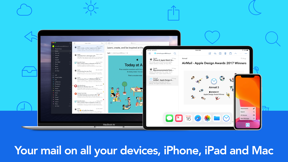


Airmail is a productivity-focused email client for iOS and macOS that prioritizes local data processing and workflow customization for professional users.
The App DNA
What makes this app unique?
The app serves users who require granular control over their inbox and deep integration with third-party task managers, displacing standard clients that prioritize AI-driven automation over manual workflow efficiency.
For Professionals and power users who manage multiple email accounts and require deep integration with productivity tools.
What does it look like?
Key features
Aggregates messages from multiple accounts into a single view.
Processes data locally and blocks tracking pixels.
Combines multiple steps into a single trigger.
How much does it cost?
Freemium model gates core productivity features like Unified Inbox and Realtime Monitoring behind an auto-renewable subscription.
Velocity
Maintenance developmentperformanceopaqueShow more...
The app is currently in a maintenance phase, with the latest release occurring 106 days ago. Development activity is limited to minor bug fixes, with no new features or content updates identified in the recent history. The release cadence has slowed significantly, averaging less than one update every three months. This pattern suggests a focus on stability rather than active feature expansion.
Who built it?
Bloop S.R.L.
3 apps tracked · Productivity
 Airmail - Lightning Fast Email
 Airmail for Business
User Sentiment
What do users think recently?
Review voice lately leans frustrated. Users appreciate folder organization features allow users to categorize emails effectively for better inbox management and secure handling of personal data provides peace of mind for users managing official correspondence, but report authentication failures with microsoft exchange and office 365 accounts prevent users from accessing work email.
How are ratings & reviews evolving?
What users say, by theme
- Folder organization features allow users to categorize emails effectively for better inbox management
- Secure handling of personal data provides peace of mind for users managing official correspondence
- Authentication failures with Microsoft Exchange and Office 365 accounts prevent users from accessing work email
61 of 151 recent reviews analyzed · high confidence · Frustrated overall
Read the full review analysisUnlock 2 more frustration themes and 1 user request, each backed by review evidence.
Access the full report for freeCompetition
Competitive landscape for Airmail for Gmail Outlook Mail
How's the Productivity market?
Airmail holds a niche position in the productivity category, currently ranking #88 Grossing in the US. The gap between its utility-driven feature set and the lack of recent updates suggests a reliance on legacy power-user retention rather than new-user acquisition.
Read the market outlookThe rivals identified

By SpikeNow Ltd.
Spike remains the most direct 'alternative' mail client, successfully bridging the gap between email and real-time team collaboration.
- Conversational UI: Transforms email threads into chat-like bubbles for faster, more intuitive consumption.
- Integrated Team Collaboration: Native support for team chat and collaborative documents within the inbox.
- AI-Driven Inbox Management: Automated 'Priority' sorting that reduces manual workflow overhead.


Unlock the head-to-head verdict: where this rival wins, and where it loses.
Access the full report for freeThe Analyst's Read
Key takeaways for Airmail for Gmail Outlook Mail
Where is it heading?
The email productivity market is consolidating around AI-assisted organization and conversational interfaces, leaving manual-workflow clients like Airmail increasingly exposed. Without a return to active feature development and a resolution of enterprise authentication issues, Airmail risks losing its core professional base to more stable, integrated alternatives.
- Critical authentication regressions for Exchange accounts prevent work email access, driving a sharp decline in professional user sentiment.
- Maintenance-only update cadence leaves the app vulnerable to high-velocity competitors who are actively shipping AI-driven organization features.
The SWOT
- Privacy-first local processing creates a brand moat against data-harvesting rivals
- Deep integration with third-party task managers maps the app into professional workflows
- Conversational UI toggle could neutralize the competitive advantage of rivals like Spike
- Granular conversation-splitting features would address top user requests for inbox control
Next best moves
Rebuild OAuth credential logic because Exchange authentication is the #1 churn driver → restore enterprise access
+ 1 more prioritized moveThe counter-intuitive read
Airmail's maintenance-mode status is not a failure but a reflection of a mature…
Read the full takeFeature gaps
Conversational chat-like UI (available in Spike but missing here) +2
Since the last report: Airmail's competitive position has declined due to critical authentication failures for enterprise accounts and a stagnant release cadence that leaves the app vulnerable to AI-native competitors. The shift from mixed to negative sentiment reflects growing user frustration with technical instability and perceived interface clutter.
Bottom line
Restoring Exchange connectivity is the immediate priority to stop the churn of enterprise users. Once stability is secured, pivoting to a conversational view will be necessary to defend the power-user segment against chat-first competitors.
Unlock 2 critical frictions, 2 market threats, 1 more prioritized move and the analyst’s take.
Access the full report for freeFAQ
Is Airmail free to use?
How does Airmail compare to Spike?
Is Airmail safe for professional use?
What are some alternatives to Airmail?
Sources
Report last updated