


App Screen Time Lock

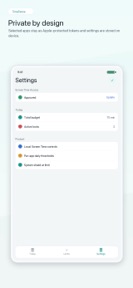


App Screen Time Lock is a productivity utility for iOS that enforces daily usage limits on specific apps using Apple's Screen Time frameworks.
The App DNA
What makes this app unique?
The app removes the cognitive friction of self-regulation by introducing an external accountability layer, shifting the burden of discipline from the user to a partner-monitored system.
For Individuals seeking to reduce screen time and manage digital distractions through self-imposed or partner-monitored constraints.
What does it look like?
Key features
Sets individual daily usage allowances for specific apps using Apple Screen Time frameworks.
Reduces impulsive setting changes after limits are active to prevent bypass.
Adds a secondary authentication step for sensitive configuration changes.
Allows users to share unlock requests and event logs with a designated local contact.
How much does it cost?
The app is currently distributed as a free utility with no visible subscription or IAP gates, limiting immediate revenue potential.
Velocity
Maintenance developmentsocial featuresUX improvementsShow more...
With only one release in the analyzed window, the app operates at a maintenance cadence of approximately one update every four months. Development is currently focused on social features and accountability tools, as evidenced by the latest release's inclusion of shareable logs and partner-mode functionality. The current pace suggests a stable but infrequent update cycle rather than active feature iteration. No further updates have been observed in the last 123 days.
Who built it?
KRISHNA PINNAMANENI
8 apps tracked · Productivity
 English Work Coach
 Classified Mesh
 PlanMeasure Takeoff
 CleanShare: Metadata Cleaner
 LockBuddy: Screen Time Lock
 AllerLens: Allergy Scanner
 GridNav Pro
User Sentiment
What do users think recently?
How are ratings & reviews evolving?
Not enough recent reviews to extract reliable themes yet.
Read the full review analysisCompetition
Competitive landscape for App Screen Time Lock
How's the Productivity market?
App Screen Time Lock occupies a specialized niche in the productivity category, focusing on accountability rather than simple blocking. The lack of recent updates (123 days since the last release) suggests a static market position that risks obsolescence as native iOS wellbeing tools evolve.
Read the market outlookThe rivals identified
Unlock the deeper market read.
Access the full report for freeThe Analyst's Read
Key takeaways for App Screen Time Lock
Where is it heading?
The digital wellbeing market is consolidating around native OS features, forcing third-party utilities to either pivot toward social accountability or face obsolescence. App Screen Time Lock is currently advantaged by its unique partner-sharing features, but the stalled development cadence leaves it exposed to platform-level changes, necessitating a rapid shift to a sustainable revenue model to fund ongoing maintenance.
- The 123-day update gap suggests the app is in maintenance mode, which increases the risk of abandonment if Apple updates its Screen Time APIs.
- The inclusion of accountability partner sharing provides a unique social-enforcement mechanism that differentiates the app from standard, solitary productivity blockers.
The SWOT
- Local-only data storage ensures privacy compliance
- Accountability partner sharing could scale into family-plan features
Next best moves
Ship a premium subscription tier because the current free-only model lacks a revenue engine → unlock sustainable development funding
+ 1 more prioritized moveThe counter-intuitive read
The app's lack of cloud-sync is not a limitation but a strategic advantage…
Read the full takeBottom line
App Screen Time Lock offers a distinct accountability-based approach to digital wellbeing, but the current lack of monetization and development activity threatens its long-term viability. Establishing a revenue stream is necessary to fund the maintenance required to keep pace with native iOS updates.
Unlock 1 critical friction, 1 market threat, 1 more prioritized move and the analyst’s take.
Access the full report for freeFAQ
Is App Screen Time Lock safe for my privacy?
How does App Screen Time Lock compare to the built-in iOS Screen Time?
Is App Screen Time Lock free to use?
What happens if I need to bypass the lock in an emergency?
Sources
- [1] App Store
Report last updated