


AppLock - Screen Time Control





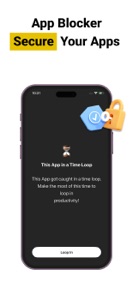
AppLock is a productivity tool for iOS that allows users to lock specific apps and restrict system-level actions like installation or deletion.
The App DNA
What makes this app unique?
The app removes the cognitive cost of digital distraction by gating access to specific categories, but the current authentication failure prevents users from maintaining the necessary session stability.
For Users seeking to manage screen time, reduce digital distractions, and restrict access to sensitive applications.
What does it look like?
Key features
Restricts access to specific applications on the device via a lock mechanism.
Organizes apps into categories like social, games, or work for batch management.
Blocks app installation, deletion, and in-app purchases at the system level.
How much does it cost?
The app is currently listed as free with no identified subscription or in-app purchase tiers.
Velocity
Maintenance developmentperformanceopaqueShow more...
The app currently operates on a maintenance cadence, with only one release shipped in the last 58 days. Development activity is limited to minor performance improvements and bug fixes, with no evidence of new features or live operations content. The release history indicates a stable but slow pace of updates, suggesting the product is in a mature state focused primarily on stability rather than active feature expansion.
Who built it?
Identiq Infotech
4 apps tracked · Productivity
 Universal TV Remote - Cast TV
 Blood Sugar Tracker & Logbook
 CricEasy - Cricket Scoring App
User Sentiment
What do users think recently?
The recent review mood reads upset.
How are ratings & reviews evolving?
What users say, by theme
- Fingerprint authentication failure forces users out of the app repeatedly during standard navigation sessions
1 of 1 recent reviews analyzed · limited sample
Read the full review analysisCompetition
Competitive landscape for AppLock - Screen Time Control
How's the Productivity market?
AppLock maintains a 1★ rating on the iOS platform based on a single review. The lack of recent feature development and the presence of a critical authentication bug position the app as a non-functional utility in the productivity category.
Read the market outlookThe rivals identified
Unlock the deeper market read.
Access the full report for freeThe Analyst's Read
Key takeaways for AppLock - Screen Time Control
Where is it heading?
The productivity utility market is consolidating around stable, high-performance tools, leaving AppLock exposed due to its critical authentication failure. Unless the development team pivots to prioritize session stability over minor bug fixes, the app will continue to see zero growth in its install base.
- The critical fingerprint authentication failure prevents session maintenance, which directly erodes the app's utility and drives the current 1★ sentiment.
- A maintenance-only release cadence with no major feature updates suggests the current authentication blocker will persist without a dedicated engineering pivot.
The SWOT
- System-level access restrictions provide a functional barrier against accidental device changes
- Implementing a robust, non-biometric fallback authentication would stabilize the user session
Next best moves
Pivot authentication logic to a stable PIN-based fallback because fingerprint failures force session termination → restore core utility
+ 1 more prioritized moveThe counter-intuitive read
The app's system-level restriction capability is a high-value…
Read the full takeBottom line
AppLock requires a stable authentication fallback to address the session termination failures that currently render the app unusable. Resolving this blocker is the only path to restoring utility and improving the 1★ rating baseline.
Unlock 1 critical friction, 1 market threat, 1 more prioritized move and the analyst’s take.
Access the full report for freeFAQ
Is AppLock safe to use for restricting apps?
Does AppLock work with fingerprint authentication?
Is there a paid version of AppLock?
Sources
- [1] App Store
Report last updated