


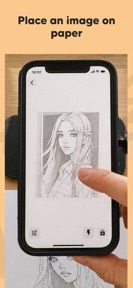
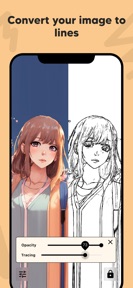

AR Draw: Trace & Sketch Master is an augmented reality drawing tool for artists and beginners to project images onto paper for manual tracing on iOS and Android.
The App DNA
What makes this app unique?
The app removes the cognitive cost of freehand perspective for users learning to draw, serving as a digital guide for physical sketching.
For Beginner artists, students, and hobbyists seeking to learn drawing techniques using mobile AR tools.
What does it look like?
Key features
Projects gallery images onto physical paper via device camera and AR overlay, expanding ad-inventory per session.
Processes photos into simplified line art for easier manual tracing, reducing friction for beginners.
Adjusts reference image transparency and magnification for precise sketching, reinforcing the habit-forming nature of the tool.
How much does it cost?
The app uses an ad-supported model with no explicit subscription pricing disclosed, though users report custom image uploads are gated behind a payment requirement.
Velocity
Maintenance developmentperformanceopaqueShow more...
The app maintains a maintenance-level cadence, with three releases identified over the observed window. Development activity is focused exclusively on stability and performance, as evidenced by the lack of feature-specific release notes. The current release pattern suggests a focus on technical upkeep rather than new content or feature expansion. The latest release occurred 14 days ago, continuing the trend of minor, non-descriptive updates.
Who built it?
Try the Colors s.r.o.
13+ apps tracked · Graphics & Design
 Baseball Pitch Speed Radar Gun
 Video Background Changer Pro
 Friendo - Friend Notes & Plan
 Music Tube: Background Player
 Speed Gun: Ball Speed Radar
 Lightbox draw - tracing paper
 Efarby - vizualizátor odtieňov
 Paint my Room: Wall Visualizer
 Emoji photo Mosaic - Make art
 Float Cam - Background camera
 AR Draw: Trace & Sketch Master
 Paint my Room - Try wall color
User Sentiment
What do users think recently?
Review voice lately leans excited. Users appreciate creative drawing tools provide a satisfying experience for users interested in artistic expression and sketching.
How are ratings & reviews evolving?
What users say, by theme
- Creative drawing tools provide a satisfying experience for users interested in artistic expression and sketching
- Aggressive advertising and paywalls prevent users from uploading custom images for their drawing projects
13 of 13 recent reviews analyzed · moderate confidence · Excited overall
Read the full review analysisUnlock 1 more frustration theme, each backed by review evidence.
Access the full report for freeCompetition
Competitive landscape for AR Draw: Trace & Sketch Master
How's the Graphics & Design market?
AR Draw: Trace & Sketch Master holds the #51 Free position in its category. The reliance on ad-supported revenue without transparent subscription tiers suggests a focus on high-volume, low-intent user acquisition rather than long-term retention.
Read the market outlookThe rivals identified
Unlock the deeper market read.
Access the full report for freeThe Analyst's Read
Key takeaways for AR Draw: Trace & Sketch Master
Where is it heading?
The Graphics & Design category is shifting toward more fluid, user-centric AR experiences that prioritize seamless interaction over aggressive ad-gating. AR Draw: Trace & Sketch Master remains exposed to churn as long as the core tracing utility is hampered by technical restrictions and paywall friction, which will likely accelerate user migration to more stable alternatives in the coming quarters.
- Technical limitations in the tracing interface (restricted screen area) drive negative sentiment, which compounds the churn pressure from aggressive ad-supported monetization.
- The current maintenance-only release cadence suggests a lack of active feature investment, leaving the app vulnerable to rivals with more frequent, user-focused updates.
The SWOT
- AR projection loop provides a tangible creative output that reinforces daily usage.
- Image-to-line conversion reduces the barrier to entry for novice artists.
- Implementing a limited-time trial for custom uploads could improve conversion from the free tier.
- Expanding the tracing area to the full screen would resolve the primary functional complaint.
Next best moves
Expand tracing area to full screen because user complaints cite restricted tracing as a top frustration → increase session duration
+ 1 more prioritized moveThe counter-intuitive read
The app's aggressive monetization is not a failure…
Read the full takeBottom line
AR Draw: Trace & Sketch Master provides a useful AR projection tool, but the current paywall on custom uploads and technical limitations in the tracing interface stifle growth. Addressing these functional gaps would unlock higher user retention and improve the app's competitive standing.
Unlock 3 critical frictions, 2 market threats, 1 more prioritized move and the analyst’s take.
Access the full report for freeFAQ
Is AR Draw: Trace & Sketch Master free to use?
Does the app work for beginners?
Why is the tracing feature not working on my screen?
Sources
Report last updated