


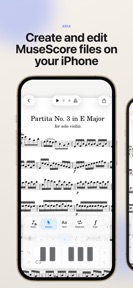
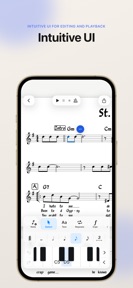


Aria is a mobile notation editor for iPhone and iPad that enables creation, editing, and playback of MuseScore and MusicXML files.
The App DNA
What makes this app unique?
Musicians use Aria to bridge the gap between desktop-based composition and mobile-based practice, removing the need for a laptop during rehearsals or commutes.
For Musicians who need a mobile-friendly interface to review, edit, and practice MuseScore files on the go.
What does it look like?
Key features
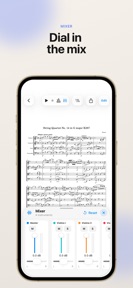
Per-instrument faders, pan, mute, and solo controls for score playback control.
Note entry via touch controls, Apple Pencil, or MIDI controller.
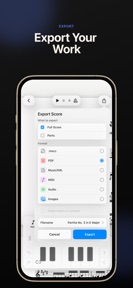
Export scores as Mscz, PDF, MusicXML, or audio files.
How much does it cost?
Aria operates as a free, open-source tool with no visible monetization gates or subscription tiers.
Velocity
Active developmentnew contentUX improvementsperformanceShow more...
Aria – Music Notation Editor maintains an active development cadence, shipping two distinct versions in the last 23 days. The latest release demonstrates a focus on functional expansion by adding a sophisticated mixer and audio engine improvements. The development trend is stable, with the publisher providing clear, feature-rich release notes for recent updates. The app is currently evolving through direct feature additions rather than a live-ops service model.
Who built it?
User Sentiment
What do users think recently?
Recent user voice shows a thrilled sentiment. Users appreciate note entry mechanics feel natural and intuitive for users without requiring external tutorials or help and portable file playback and editing capabilities allow musicians to work on arrangements during daily commutes.
How are ratings & reviews evolving?
What users say, by theme
- Note entry mechanics feel natural and intuitive for users without requiring external tutorials or help
- Portable file playback and editing capabilities allow musicians to work on arrangements during daily commutes
- Lack of UI polish in specific sub-menus creates friction during complex score editing tasks
4 of 4 recent reviews analyzed · limited sample
Read the full review analysisUnlock 1 user request, each backed by review evidence.
Access the full report for freeCompetition
Competitive landscape for Aria – Music Notation Editor
How's the Music market?
Aria occupies a niche as a free, open-source mobile notation tool, maintaining a 4.9-star rating across 22 total ratings. Its lack of monetization gates distinguishes it from commercial notation apps, though it currently lacks the advanced batch-editing features found in desktop-class rivals.
Read the market outlookThe rivals identified
Unlock the deeper market read.
Access the full report for freeThe Analyst's Read
Key takeaways for Aria – Music Notation Editor
Where is it heading?
The mobile notation market is consolidating around tools that offer seamless file compatibility with desktop standards like MuseScore. Aria is well-positioned to capture this segment by maintaining a free, open-source posture, but it must prioritize workflow efficiency to prevent power users from migrating to more robust, albeit paid, alternatives.
- The latest release (Practice Mixer, rebuilt audio engine) signals active feature investment, which improves the app's utility for mobile practice sessions.
- The current 4.9-star rating is high, but the small sample size suggests that scaling the user base will likely surface more complex UI complaints.
The SWOT
- Open-source GNU GPLv3 license drives community trust
- Touch-based notation controls reduce mobile-creation friction
- Implementing batch-edit actions for musical systems
- Expanding MIDI controller support for professional users
Next best moves
Ship batch-selection tools because users report the current selection sub-menu is too limited for efficient editing → increase power-user retention.
+ 1 more prioritized moveThe counter-intuitive read
The lack of monetization is Aria's primary competitive advantage…
Read the full takeBottom line
Aria's open-source, free-to-use model builds a strong foundation for mobile notation, but the lack of batch-editing tools limits its utility for complex arrangements. Addressing these workflow gaps would unlock higher retention among power users who currently face friction during score revisions.
Unlock 2 critical frictions, 1 market threat, 1 more prioritized move and the analyst’s take.
Access the full report for freeFAQ
Is Aria free to use?
Does Aria work with MuseScore files?
Is Aria suitable for complex score editing?
Sources
- [1] App Store, source
Report last updated