


Art Tools
By Accurasee


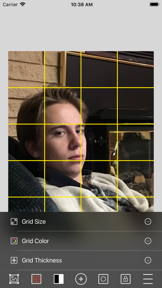


Art Tools is a paid utility for representational artists on iOS that provides compositional grids and tonal analysis tools.
The App DNA
What makes this app unique?
Users hire Art Tools to bridge the gap between digital reference photos and physical canvas proportions, saving time on manual layout work.
For Representational artists and students seeking digital tools to improve proportion, composition, and tonal accuracy in their work.
What does it look like?
Key features
Overlays including golden ratio or custom grids to assist with canvas layout and subject analysis.
Digital filter to convert reference photos to black and white for checking tonal values.
Local saving of project configurations for future reference or email export.
How much does it cost?
Paid model at $2.99 provides full access to all drawing tools without recurring subscription costs.
Velocity
Maintenance developmentUX improvementsShow more...
Art Tools has shipped only one release in the last 200 days, placing it firmly in the maintenance tier. The latest version introduced minor utility features such as a golden ratio grid and reset buttons, but there has been no development activity since January 2026. The current cadence indicates a lack of active feature development or ongoing support. Development appears to have stalled significantly over the last six months.
Who built it?
User Sentiment
What do users think recently?
The recent review mood reads excited. Users appreciate the value checker tool provides artists with objective tonal analysis for improved composition and painting and grid overlay functionality enables artists to accurately transfer photo proportions to physical drawing paper surfaces.
How are ratings & reviews evolving?
What users say, by theme
- The value checker tool provides artists with objective tonal analysis for improved composition and painting
- Grid overlay functionality enables artists to accurately transfer photo proportions to physical drawing paper surfaces
- Lack of clear onboarding or instructions forces users to guess how to use core features
41 of 41 recent reviews analyzed · high confidence · Excited overall
Read the full review analysisUnlock 2 more frustration themes and 2 user requests, each backed by review evidence.
Access the full report for freeCompetition
Competitive landscape for Art Tools
How's the Education market?
Art Tools maintains a niche position in the Education category with a 3.43-star rating across 255 total ratings. The lack of updates for 200 days signals a maintenance-mode posture that risks losing ground to active competitors.
Read the market outlookThe rivals identified
Unlock the deeper market read.
Access the full report for freeThe Analyst's Read
Key takeaways for Art Tools
Where is it heading?
The market for digital art utilities is shifting toward automated, high-frequency feature updates, leaving Art Tools exposed. Without a shift from maintenance-mode to active feature development, the app will continue to lose relevance to competitors that offer color-scheme helpers and automated scaling.
- Persistent application instability during photo uploads disrupts the creative workflow, which compounds the rating drag already visible on the platform.
- The lack of clear onboarding forces users to guess at core features, which suppresses long-term retention and drives negative sentiment.
The SWOT
- Value checker tool provides objective tonal analysis for improved painting
- Adding automated color-scheme helpers would address top user feature requests
Next best moves
Ship onboarding tutorial because lack of instructions is a top complaint → increase new-user retention
+ 1 more prioritized moveThe counter-intuitive read
The app's maintenance-mode status is a strategic liability…
Read the full takeSince the last report: The app's competitive position has declined due to a stagnant development cadence and increasing pressure from modern, feature-rich alternatives.
Bottom line
Art Tools provides essential tonal and compositional utilities, but persistent instability and a lack of onboarding erode user trust, so the team must prioritize stability fixes before adding new features to prevent further churn.
Unlock 2 critical frictions, 1 market threat, 1 more prioritized move and the analyst’s take.
Access the full report for freeSources
- [1] App Store reviews
- [2] Developer website, source
Report last updated