


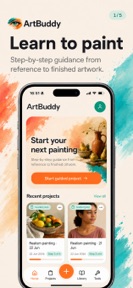


ArtBuddy is a painting utility for iOS that provides a guided workflow and digital tools for tracing and color mixing.
The App DNA
What makes this app unique?
The app removes the financial and spatial friction of physical projectors and manual color-mixing guides for hobbyist painters.
For Beginner and intermediate painters looking for technical assistance with reference images and color mixing.
What does it look like?
Key features
Camera-based overlay to project reference images onto physical canvases, replacing physical hardware.
Automated suggestions for mixing acrylic or oil paints based on reference images.
Step-by-step instructional path for tracing, value building, and color layering.
How much does it cost?
ArtBuddy operates as a free utility with no visible subscription or IAP gates, limiting its revenue potential.
Velocity
Maintenance developmentUX improvementsnew contentShow more...
ArtBuddy currently operates at a maintenance cadence, with only one release shipped in the last 60 days. Development is focused on UX improvements, specifically the introduction of structured guided painting projects. The current pace suggests a focus on stability and occasional feature additions rather than rapid iteration. No further updates have been observed since the latest release in late June 2026.
Who built it?
Justinus Laurentius van den Berg
2 apps tracked · Graphics & Design
 Drawing Projector Lite
User Sentiment
What do users think recently?
How are ratings & reviews evolving?
Not enough recent reviews to extract reliable themes yet.
Read the full review analysisCompetition
Competitive landscape for ArtBuddy: Learn to paint
How's the Graphics & Design market?
ArtBuddy operates as a free utility in the Graphics & Design category, providing a cost-free alternative to hardware-dependent painting aids.
Read the market outlookThe rivals identified
Unlock the deeper market read.
Access the full report for freeThe Analyst's Read
Key takeaways for ArtBuddy: Learn to paint
Where is it heading?
The painting-utility market is consolidating around apps that offer both instruction and digital tools. ArtBuddy's current maintenance-mode cadence leaves it exposed to competitors who can iterate faster on monetization and content, which will likely erode its user-acquisition advantage if no revenue model is established.
- The latest release introduced a guided project workflow, but the app has otherwise remained quiet with no new updates in the last 60 days.
The SWOT
- Camera-based projector tool replaces physical hardware costs
- Premium tier for advanced AI color mixing
Next best moves
Implement a freemium model because the current free-only structure limits revenue potential → increase lifetime value
The counter-intuitive read
The lack of monetization is not a weakness…
Read the full takeSince the last report: ArtBuddy maintains its current feature set and maintenance cadence, with the primary shift occurring in the strategic framing of its monetization path and competitive threats.
Bottom line
ArtBuddy provides a functional digital alternative to physical painting hardware, but the lack of a monetization strategy leaves the app vulnerable to better-funded competitors. Implementing a freemium model would unlock the revenue needed to sustain long-term feature development.
Unlock 1 critical friction, 1 market threat and the analyst’s take.
Access the full report for freeFAQ
Is ArtBuddy free to use?
Does ArtBuddy require physical hardware to project images?
What painting styles does ArtBuddy support?
Sources
- [1] App Store, source
Report last updated