


Auto Tap & Swipe on Screen





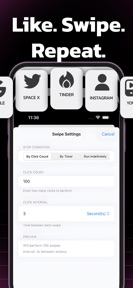


Auto Tap & Swipe on Screen is a web automation utility for iOS that allows users to schedule taps, swipes, and refreshes within a private, built-in browser.
The App DNA
What makes this app unique?
The app removes the manual friction of refreshing web dashboards and monitoring live data feeds, though its current implementation forces users to pay before verifying core functionality.
For Users seeking to automate repetitive web tasks like refreshing dashboards or monitoring live updates.
What does it look like?
Key features
Configurable tap, swipe, and refresh actions for specific website elements.
Isolated browsing environment where all automation scripts execute.
Activity tracking dashboard for monitoring automated routine performance.
How much does it cost?
The app utilizes a subscription-gated model where core utility is restricted to paid users.
Velocity
Dormant developmentopaqueShow more...
The app has entered a zombie state, with no new feature builds or updates released in the last 266 days. Development activity has ceased entirely, leaving the app without any recent improvements or maintenance. Given the lack of activity for over eight months, there is no current development momentum.
Who built it?
Abdessamad Hergoum
2 apps tracked · Utilities
 No Contact tracker Timer
User Sentiment
What do users think recently?
Fresh user feedback skews frustrated. Users appreciate initial impressions from a subset of users indicate the core concept provides immediate satisfaction upon first launch.
How are ratings & reviews evolving?
What users say, by theme
- Initial impressions from a subset of users indicate the core concept provides immediate satisfaction upon first launch
- Mandatory rating prompts block the interface and prevent users from accessing the core functionality
5 of 5 recent reviews analyzed · limited sample
Read the full review analysisUnlock 2 more frustration themes, each backed by review evidence.
Access the full report for freeCompetition
Competitive landscape for Auto Tap & Swipe on Screen
How's the Utilities market?
Auto Tap & Swipe on Screen holds a 4.56-star rating across 99 total ratings, yet the lack of updates for 266 days signals a maintenance-mode posture.
Read the market outlookThe rivals identified
Unlock the deeper market read.
Access the full report for freeThe Analyst's Read
Key takeaways for Auto Tap & Swipe on Screen
Where is it heading?
The market for web automation utilities is shifting toward high-frequency, feature-rich tools that integrate with broader browser workflows. Auto Tap & Swipe on Screen remains stagnant, and its reliance on blocking rating prompts suggests a lack of confidence in its own retention loop, which will likely accelerate churn into the next quarter.
- The 8-month update gap suggests the developer has moved to maintenance mode, which prevents the app from addressing critical user-interface complaints.
- Mandatory rating prompts block the interface, which creates a negative first-impression loop that compounds the existing dissatisfaction with core functionality.
The SWOT
- Isolated browsing environment prevents script interference
- Replace rating-prompt barrier with non-intrusive onboarding
Next best moves
Sunset the mandatory rating prompt because it blocks core functionality and drives negative sentiment → improve first-time user conversion
+ 1 more prioritized moveThe counter-intuitive read
The app's 4.56-star rating is a vanity metric…
Read the full takeSince the last report: The app remains in a dormant state with no functional updates, but the analytical focus has shifted toward the critical churn risk posed by the mandatory rating prompt and the subscription-gated onboarding.
Bottom line
Removing the mandatory rating gate would unlock the primary conversion funnel, as the current friction prevents users from verifying the core automation utility before they churn.
Unlock 3 critical frictions, 1 market threat, 1 more prioritized move and the analyst’s take.
Access the full report for freeFAQ
Is Auto Tap & Swipe on Screen free to use?
Does Auto Tap & Swipe on Screen work for mobile games?
Why can't I access the app after downloading?
Sources
- [1] App Store
Report last updated