


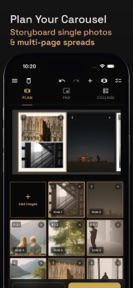




Batchpad is a bulk photo-padding tool for iOS that allows photographers to apply aspect ratio borders to entire albums without cropping.
The App DNA
What makes this app unique?
The app removes the time cost of manual editing by enabling 3-tap batch processing for 100+ photos at once, displacing the need for repetitive manual adjustments in standard photo editors.
For Photographers, visual artists, and social media creators requiring precise aspect ratio control and bulk editing tools.
What does it look like?
Key features
Applies uniform borders to 100+ photos simultaneously without cropping, driving retention by reducing time-to-post.
Processes images locally without cloud uploads, establishing a privacy-first value proposition.
Drag-and-drop interface for organizing multi-page spreads, increasing time-in-app via complex content planning.
How much does it cost?
Monetization relies on a free-to-use model with optional paid upgrades, keeping the entry barrier low for casual creators.
Velocity
Active developmentnew contentUX improvementsShow more...
Batchpad currently maintains an active development cadence, shipping two releases within the last three days. The latest version demonstrates a focus on feature expansion by adding robust backup capabilities and automated photo layout tools. Development appears stable and feature-driven, with the most recent update providing significant functional improvements over the previous minor release. This trajectory suggests a consistent effort to enhance the core user experience through both utility and creative tools.
Who built it?
Yellowsquared
7 apps tracked · Photo & Video
 Pointsuno: Points & Miles Math
 Name Scout: Baby Names for Two
 Timeli: One-Tap Timestamp Log
 Studio Softbox Light - Lumet
 Bookmark Places: PhotoSpots
 Past Weather History: Eranorms
User Sentiment
What do users think recently?
How are ratings & reviews evolving?
Not enough recent reviews to extract reliable themes yet.
Read the full review analysisCompetition
Competitive landscape for Batchpad: No Crop Photo Border
How's the Photo & Video market?
Batchpad holds a niche position in the Photo & Video category, focusing on bulk utility rather than artistic filters. With a 5.0 rating across 10 reviews, the app maintains high user satisfaction by delivering on its core promise of local, high-quality batch processing.
Read the market outlookThe rivals identified
Unlock the deeper market read.
Access the full report for freeThe Analyst's Read
Key takeaways for Batchpad: No Crop Photo Border
Where is it heading?
Users report: The market for specialized photo utilities is shifting toward privacy-first, local-only tools as users grow wary of cloud-based data harvesting. Batchpad is well-positioned to capitalize on this trend, provided it continues to expand its layout capabilities to match the complexity of modern social media carousels.
- The latest release (backup and restore) demonstrates a commitment to workflow reliability, which builds trust with professional users.
- Active development cadence (two updates in three days) suggests the team is responding quickly to user needs, increasing the likelihood of feature-set expansion.
The SWOT
- Local-only processing ensures 100% native quality and privacy
- Bulk padding workflow reduces time-to-post for high-volume creators
- Expanding carousel-split templates captures multi-slide storytelling demand
- Integrating direct social sharing could increase daily active usage
Next best moves
Ship carousel-split templates because it increases time-in-app → higher retention
+ 1 more prioritized moveThe counter-intuitive read
The app's lack of cloud features is its primary strength…
Read the full takeSince the last report: Batchpad has shifted its product roadmap to prioritize carousel-split templates and onboarding improvements, signaling a move toward deeper user retention. The competitive positioning now more clearly contrasts the app's local-only model against broader, cloud-heavy editing suites.
Bottom line
Batchpad's local-first bulk processing provides a clear utility for creators, but the current single-use focus leaves it vulnerable to feature-creep from broader editing suites. Prioritizing the carousel-split workflow would deepen the retention loop for social-first users.
Unlock 2 critical frictions, 2 market threats, 1 more prioritized move and the analyst’s take.
Access the full report for freeFAQ
Is Batchpad free to use?
Does Batchpad crop my photos?
Are my photos uploaded to the cloud?
What is the best alternative for bulk photo editing?
Sources
- [1] App Store, source
Report last updated