


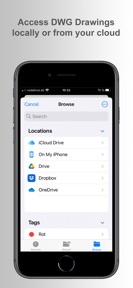
biiCADo Mobile is a 2D CAD application for iOS that enables the creation and editing of technical drawings in DWG and DXF formats.
The App DNA
What makes this app unique?
The app removes the friction of needing a desktop workstation to perform light edits on technical files while on the move.
For Engineers, architects, and designers who need to view or perform light edits on technical CAD drawings while on mobile devices.
What does it look like?
Key features
Creation and editing of technical drawings using points, lines, polylines, arcs, and splines. Core utility gate — requires subscription or lifetime license for access to editing features.
Read and save industry-standard CAD file formats for interoperability with desktop software. Professional-grade file compatibility — primary value proposition for the paid-tier gate.
Access to DWG files stored in Dropbox, OneDrive, and Google Drive via the iOS Files app. Retention lever — enables mobile workflows by connecting to existing user file storage.
How much does it cost?
Freemium model gates all creation and editing tools behind a subscription or one-time purchase, leaving only file viewing for the free tier.
Velocity
Dormant developmentUX improvementsShow more...
The app has been inactive for 566 days, indicating a complete cessation of development. With no updates or feature additions in over a year and a half, the project shows no signs of active maintenance or support. The last recorded update introduced a minor command addition, but the lack of subsequent activity confirms a zombie status.
Who built it?
BAST Ingenieur Informatik UG (haftungsbeschränkt)
1 app tracked · Productivity
Explore the full publisher profileUser Sentiment
What do users think recently?
The recent review mood reads frustrated. Users appreciate drawing tools maintain a familiar workflow that allows long-term users to transition between versions.
How are ratings & reviews evolving?
What users say, by theme
- Drawing tools maintain a familiar workflow that allows long-term users to transition between versions
- Application crashes during zoom gestures on the latest build, rendering the software unusable for drafting
2 of 2 recent reviews analyzed · limited sample
Read the full review analysisUnlock 2 more frustration themes and 1 user request, each backed by review evidence.
Access the full report for freeCompetition
Competitive landscape for biiCADo Mobile - CAD App
How's the Productivity market?
biiCADo Mobile occupies the mobile CAD utility space, though its 2.33-star rating across 3 reviews signals significant friction in the current build. The lack of updates for over 18 months limits its competitive standing against active alternatives.
Read the market outlookThe rivals identified
Unlock the deeper market read.
Access the full report for freeThe Analyst's Read
Key takeaways for biiCADo Mobile - CAD App
Where is it heading?
The app has been silent for 18 months, with the last release occurring in February 2025. The current maintenance-only cadence, combined with critical stability regressions, suggests the product is not receiving the active development required to maintain professional-grade utility, which will likely accelerate subscriber churn into the next quarter.
- The latest release added trim and extend commands, but post-update reviews highlight severe new stability and printing regressions that overshadow this feature addition.
The SWOT
- Familiar drawing-tool workflow allows long-term users to transition between versions without retraining
- Implementing a functional print-window tool would address the primary export frustration for users
Next best moves
Patch the zoom-gesture crash because it is the #1 blocker for drafting utility → restore basic usability
+ 1 more prioritized moveThe counter-intuitive read
The app's primary risk is not feature parity…
Read the full takeBottom line
Restoring stability during navigation is the immediate priority for biiCADo Mobile, as the current crash-on-zoom bug prevents basic professional utility. Addressing this will stabilize the user base before the team can pivot to requested printing improvements.
Unlock 1 critical friction, 1 market threat, 1 more prioritized move and the analyst’s take.
Access the full report for freeFAQ
Is biiCADo Mobile free to use?
Does biiCADo Mobile support cloud storage?
Is biiCADo Mobile reliable for professional drafting?
Sources
- [1] App Store, source
Report last updated