


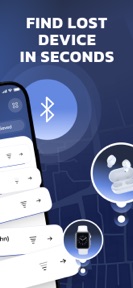

Bluetooth BLE Finder & Scanner is a utility for locating misplaced Bluetooth devices via signal strength metrics on iOS.
The App DNA
What makes this app unique?
The app removes the cognitive friction of searching for lost headphones or trackers by providing a visual proximity indicator.
For Users seeking to locate misplaced personal electronics like earbuds, smartwatches, and fitness trackers.
What does it look like?
Key features
Visual feedback loop showing proximity to Bluetooth-enabled devices via signal strength.
Automated logic to ignore distant or inactive Bluetooth hardware during search.
How much does it cost?
The app forces a weekly subscription commitment after a single scan attempt, which users report as a deceptive barrier.
Velocity
Dormant developmentopaqueShow more...
Bluetooth BLE Finder & Scanner has seen no development activity for over a year. With only a single minor release recorded in the analyzed window and a total absence of updates for 399 days, the app is currently in a state of abandonment. There is no evidence of ongoing maintenance or feature development.
Who built it?
User Sentiment
What do users think recently?
Recent user voice shows a frustrated sentiment. Users appreciate the core scanning utility provides a sense of control for users tracking missing personal electronic devices.
How are ratings & reviews evolving?
What users say, by theme
- The core scanning utility provides a sense of control for users tracking missing personal electronic devices
- Aggressive paywalls force users into weekly subscription commitments after only a single scan attempt
5 of 5 recent reviews analyzed · limited sample
Read the full review analysisUnlock 1 more frustration theme, each backed by review evidence.
Access the full report for freeCompetition
Competitive landscape for Bluetooth BLE Finder & Scanner
How's the Utilities market?
Bluetooth BLE Finder & Scanner operates in the Utilities space with a 4.27-star rating across 172 total ratings. The lack of updates for over a year suggests a stagnant position compared to category peers that maintain active release cycles.
Read the market outlookThe rivals identified
Unlock the deeper market read.
Access the full report for freeThe Analyst's Read
Key takeaways for Bluetooth BLE Finder & Scanner
Where is it heading?
The category is consolidating around utilities that offer reliable, free-to-start scanning experiences. Bluetooth BLE Finder & Scanner remains exposed due to its lack of development and restrictive monetization, which will likely accelerate user migration to more stable, free-tier-supported rivals.
- The 399-day update gap indicates the app is in maintenance mode, which prevents feature expansion and stability improvements.
- Aggressive paywalls after a single scan drive negative sentiment, which compounds the churn risk already present from technical instability.
The SWOT
- Smart scanning filter ignores inactive hardware
- Freemium model adoption to lower entry friction
Next best moves
Pivot the monetization model to a freemium structure because the current weekly subscription after one scan drives negative reviews → increase long-term user retention
+ 1 more prioritized moveThe counter-intuitive read
The app's #1 weakness is its greatest potential asset…
Read the full takeSince the last report: Development activity remains at a standstill with no changes to the feature set, pricing, or user sentiment. The only material shifts are internal reclassifications of existing features within the SWOT analysis and a more focused contrarian outlook.
Bottom line
The current subscription-only model after a single scan creates a high-friction funnel that invalidates the app's utility for most users. Pivoting to a freemium model would unlock the user base and address the primary driver of negative sentiment.
Unlock 2 critical frictions, 1 market threat, 1 more prioritized move and the analyst’s take.
Access the full report for freeFAQ
Is Bluetooth BLE Finder & Scanner free to use?
Does Bluetooth BLE Finder & Scanner work for all Bluetooth devices?
What are the main frustrations with this app?
Sources
- [1] App Store, source
Report last updated