






busybusy GPS Time Clock Mobile is a cloud-based time tracking and job costing application for construction and field service teams on iOS and Android.
The App DNA
What makes this app unique?
The platform removes the administrative friction of paper timecards by automating labor cost reporting and GPS-verified clock-ins, which allows construction managers to monitor project budgets in real-time.
For Construction and field service contractors, including excavators, landscapers, and electrical firms.
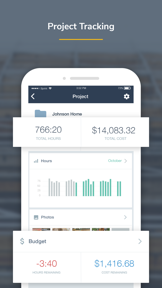
What does it look like?
Key features
Clock in/out with location verification; functions as a B2B distribution barrier by ensuring compliance on remote job sites.
Real-time labor budget versus actual cost tracking; serves as a paid-tier gate for construction managers.
Integrated payroll processing; reduces administrative overhead by 67%.
How much does it cost?
Freemium model anchored by a 14-day free trial, targeting construction contractors with tiered access to advanced modules.
Velocity
Maintenance developmentperformanceopaqueShow more...
The app maintains a low-frequency release cadence of approximately 0.14 releases per week, placing it firmly in the maintenance tier. Development activity is currently limited to minor stability and performance patches, with no evidence of new features or live-ops content. The publisher utilizes opaque release notes, providing no insight into the specific technical or functional changes being deployed. This pattern suggests a focus on long-term stability rather than active feature development.
Who built it?
User Sentiment
What do users think recently?
Fresh user feedback skews frustrated. Users appreciate efficient time tracking and project management tools help construction business owners monitor labor costs, but report invasive background location tracking persists even when employees are not clocked into the application.
How are ratings & reviews evolving?
What users say, by theme
- Efficient time tracking and project management tools help construction business owners monitor labor costs
- Invasive background location tracking persists even when employees are not clocked into the application
61 of 109 recent reviews analyzed · high confidence · Frustrated overall
Read the full review analysisUnlock 1 user request, each backed by review evidence.
Access the full report for freeCompetition
Competitive landscape for busybusy GPS Time Clock Mobile
How's the Business market?
busybusy currently holds a #46 Free position in its category. The lack of major updates in the last six months signals a maintenance-mode posture that risks losing ground to more active rivals.
The rivals identified

By CAKE.com
Clockify competes directly with busybusy by offering broad, cross-industry time tracking and team management tools that overlap with busybusy’s core labor-tracking functionality.
- Offers a massive, free-tier feature set that attracts small teams and individual freelancers globally
- Provides extensive third-party integrations with project management tools that busybusy currently lacks in its ecosystem
- Maintains a massive global user base, creating a network effect that makes it the default choice
 Timely Automatic Time TrackingContender
 ezClocker: Employee Time TrackContender
 Hilti ON!Track 3Contender
 My Overtime (MO)Contender
Unlock the head-to-head verdict: where this rival wins, and where it loses.
Access the full report for freeThe Analyst's Read
Key takeaways for busybusy GPS Time Clock Mobile
Where is it heading?
The construction time-tracking market is consolidating around platforms that offer deeper integration with existing project management stacks. busybusy remains exposed due to its maintenance-only update cadence, which prevents it from answering the feature-parity pressure applied by Clockify.
- Invasive location tracking complaints erode the daily active habit, which compounds the rating drag already visible on Android.
- The latest release ships only maintenance-mode bug fixes, signaling a pivot away from feature expansion.
The SWOT
- GPS-verified time tracking functions as a B2B distribution barrier into remote job sites
- Localized payroll compliance features could capture market share in regions where busybusy currently lacks specialized tax support
Next best moves
Ship user-controlled location privacy settings because invasive tracking is the top complaint theme → reduce churn risk
The counter-intuitive read
The maintenance-mode release cadence is a strategic choice to focus on enterprise stability…
Read the full takeFeature gaps
Extensive third-party integrations with project management tools (available in Clockify but absent here)
Since the last report: The product strategy has pivoted from feature growth to retention defense, as the team pauses development to address invasive location tracking complaints. This shift reflects a move into a maintenance-only posture that leaves the app exposed to more active competitors.
Bottom line
Prioritizing user-controlled location privacy settings would address the primary churn driver surfacing in recent reviews, protecting the core construction user base from defecting to less intrusive alternatives.
Unlock 1 critical friction, 1 market threat and the analyst’s take.
Access the full report for freeFAQ
Is busybusy suitable for small construction crews?
How does busybusy compare to Clockify?
Does busybusy track my location when I am off the clock?
What are some alternatives to busybusy for time tracking?
Sources
Report last updated