


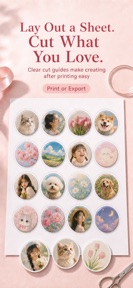
Button Badge Maker is a layout tool for DIY badge and button creation on iOS, enabling users to generate print-ready A4 templates from photos.
The App DNA
What makes this app unique?
The tool removes the manual design friction of cropping and grid-aligning photos for physical merch, displacing general-purpose design software that lacks real-world sizing controls.
For DIY creators and small-batch merch makers who need print-ready templates for buttons and badges.
What does it look like?
Key features
Auto-crops and grid-centers up to 50 photos onto a single print-ready A4 page.
Recalculates page layout based on user-defined diameter in millimeters.
Supports TTF, OTF, and TTC file imports from the Files app.
How much does it cost?
The freemium model uses a daily usage cap to drive conversion to Pro for high-volume badge creators.
Velocity
Active developmentnew contentUX improvementsShow more...
Button Badge Maker is currently in an active development phase, shipping two releases within the last six days. The latest version demonstrates a focus on feature expansion, specifically enhancing text layout and graphic integration capabilities. This cadence suggests a stable, iterative development cycle aimed at improving core design functionality. The developer is actively iterating on the user experience through frequent, feature-rich updates.
Who built it?
User Sentiment
What do users think recently?
How are ratings & reviews evolving?
Not enough recent reviews to extract reliable themes yet.
Read the full review analysisCompetition
Competitive landscape for Button Badge Maker
How's the Photo & Video market?
Button Badge Maker holds a 5-star rating on the iOS App Store. Its focus on physical print-ready templates differentiates it from general-purpose photo editors that lack mm-based sizing controls.
Read the market outlookThe rivals identified
Unlock the deeper market read.
Access the full report for freeThe Analyst's Read
Key takeaways for Button Badge Maker
Where is it heading?
The market for specialized print-utility tools is consolidating around apps that offer precise physical-world controls. Button Badge Maker is well-positioned to capture the small-batch merch segment by focusing on the print-ready workflow, which general-purpose editors often ignore.
- The active release cadence (two updates in six days) demonstrates a commitment to feature expansion, which improves the tool's utility for power users.
- The addition of advanced text-pathing and custom font support directly addresses the needs of professional merch makers, increasing the app's competitive defensibility.
The SWOT
- Real-world sizing engine ensures physical print accuracy
- One-tap grid-centering handles 50 photos per page
- Expanding symbol library for professional badge-making segments
Next best moves
Introduce a tiered export pack for occasional high-volume users because the daily cap is a hard friction point → increase conversion
The counter-intuitive read
The daily export cap is a retention feature, not just a monetization gate…
Read the full takeSince the last report: The app has pivoted its competitive narrative to emphasize professional-grade print accuracy and mm-based sizing, while shifting its monetization strategy toward high-volume user export packs.
Bottom line
Button Badge Maker succeeds by automating the specific, time-consuming workflow of physical badge layout. If the developer maintains this focus on print-accuracy, the tool will retain its value for small-batch creators, even as general-purpose design apps expand their feature sets.
Unlock 1 critical friction, 1 market threat and the analyst’s take.
Access the full report for freeFAQ
Is Button Badge Maker suitable for professional badge making?
Does the free version allow unlimited badge printing?
What shapes can I use for my badges?
Sources
- [1] App Store, source
Report last updated