


CAD Reader & Editor


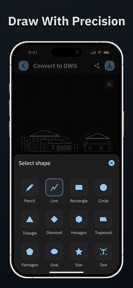
CAD Reader & Editor is a mobile tool for viewing and annotating DXF technical drawings, designed for engineers and construction professionals.
The App DNA
What makes this app unique?
The app removes the dependency on desktop workstations for on-site plan review, allowing users to make quick markups and measurements while in the field.
For Engineers, architects, construction professionals, and students requiring mobile CAD access.
What does it look like?
Key features
Opens and renders DXF format CAD drawings with high-precision geometry display.
Adds lines, shapes, and measurements to drawings to enable on-site collaboration.
Exports drawings to PDF or image formats for external sharing.
How much does it cost?
Monetization relies on a single lifetime purchase to remove ads, targeting users who require a permanent, ad-free mobile CAD viewer.
Velocity
Maintenance developmentperformanceShow more...
The app is currently in a maintenance phase, with only one release recorded in the analyzed window. The latest version focuses exclusively on performance and stability improvements rather than new features. Development activity is infrequent, with the last update occurring 89 days ago. There is no evidence of live operations or active feature development.
Who built it?
Sachinbhai Surani
13+ apps tracked · Productivity
 Easy Crane Lift Planner
 Creador de podcasts:
 Cheque Writer & Printer
 ElbowCalc - Flat Pattern Maker
 Bet Calculator.
 Beam Calculator.
 Daily Expense Manager.
 Sheet Metal Calculator Pro
 Receipt Maker - Smart
 Duct Calculator.
 Easy Metal Paint Calculator
 Resistor Color Code Calc.
User Sentiment
What do users think recently?
How are ratings & reviews evolving?
Not enough recent reviews to extract reliable themes yet.
Read the full review analysisCompetition
Competitive landscape for CAD Reader & Editor
How's the Productivity market?
CAD Reader & Editor maintains a 4.0-star rating on the iOS platform, though the low review count of 4 signals limited market penetration. The 89-day gap since the last update indicates a maintenance-focused strategy rather than aggressive growth.
Read the market outlookThe rivals identified
Unlock the deeper market read.
Access the full report for freeThe Analyst's Read
Key takeaways for CAD Reader & Editor
Where is it heading?
The mobile CAD market is consolidating around tools that offer seamless cloud integration and real-time collaboration. CAD Reader & Editor remains in a maintenance posture, which exposes it to churn if professional users migrate to platforms that solve the cross-device file access friction.
- The 89-day update cadence suggests a stable, maintenance-only posture rather than an expansion phase, which limits competitive growth.
The SWOT
- High-precision DXF rendering enables accurate on-site plan review
- Cloud storage integration could capture users needing cross-device file access
Next best moves
Audit cloud storage integration requirements because the current offline-only model limits professional utility → increase user retention
The counter-intuitive read
The maintenance-mode status is a defensive choice that…
Read the full takeSince the last report: The app remains in a maintenance-only state with no changes to features or pricing. The analysis has shifted to more explicitly frame the lack of cloud-sync as a direct driver of user churn and competitive displacement.
Bottom line
CAD Reader & Editor provides essential mobile viewing for DXF files, but the lack of active feature development limits its utility for professional workflows that require cloud-sync and real-time collaboration.
Unlock 1 critical friction, 1 market threat and the analyst’s take.
Access the full report for freeFAQ
Is CAD Reader & Editor suitable for professional engineering work?
Does CAD Reader & Editor require a subscription?
What are the alternatives to CAD Reader & Editor?
Sources
- [1] App Store
Report last updated