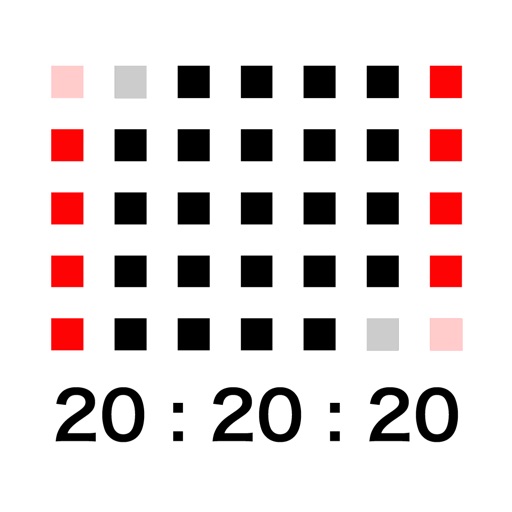


Calendar Clock is a utility application designed to function as a persistent desk clock that displays the year, month, week, and precise time. It offers a minimalist interface with customizable theme colors, including dark, light, green, and blue options. The app is notable for its ability to keep the device screen active while in use.
Overview · Full Intel report in progress
The App DNA
What makes this app unique?
For Users seeking a simple, aesthetic, and always-on digital clock for their workspace.
What does it look like?
Key features
Displays the current year, month, week, hours, minutes, and seconds on a single screen.
Allows users to switch between dark, light, green, and blue color themes.
Prevents the device from entering sleep mode while the application is running.
How much does it cost?
Velocity
Who built it?
Systemiko
13+ apps tracked · Utilities
 西暦 和暦 現在の年月日 & 早見表
 日本の記念貨幣
 楽々割り勘
楽々割り勘 Maritime Signal Flags
 Armenian Keyboard for iPhone and iPad - phonetic layout
 Light Box - Illuminator Viewer
 Red Rubber Stamp Stickers
 Simple Ruler inch/cm
 Musical Instruments Stickers
 Protractor (Virtual & Simple)
 TapTime – Time & Count
 Food & Drink Stickers
User Sentiment
What do users think recently?
How are ratings & reviews evolving?
Not enough recent reviews to extract reliable themes yet.
Read the full review analysisCompetition
Competitive landscape for Calendar Clock
How's the Utilities market?
The rivals identified
The Analyst's Read
Key takeaways for Calendar Clock
Where is it heading?
Bottom line
This utility functions as a dedicated desk clock that requires an active power source due to its screen-on functionality.
Report last updated