

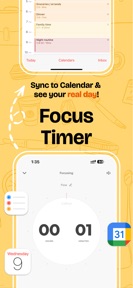


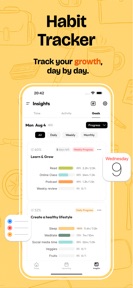
Calflow is a time-tracking planner for iOS that synchronizes Apple Reminders and Calendar events into a unified dashboard.
The App DNA
What makes this app unique?
The app removes the financial friction of recurring subscriptions for users who want to track time distribution across their existing Apple workflows.
For Productivity-focused users who rely on Apple Reminders and Calendar and want to track time spent on tasks and habits.
What does it look like?
Key features
Synchronizes iOS Reminders and Apple Calendar events with Google Calendar integration.
Visualizes time distribution across day, week, month, and year using smart tags and groups.
Imports mindful minutes, sleep data, and workout duration into the planner view.
How much does it cost?
Calflow operates as a free utility with a lifetime license model, offering a significant value proposition compared to subscription-based productivity competitors.
Velocity
Maintenance developmentUX improvementsperformanceShow more...
Calflow: Planner & Tracker is currently in a maintenance phase, having shipped only one minor update in the last 118 days. The latest release focused exclusively on technical refinements, including autocorrect fixes, color picker adjustments, and widget display improvements. Development activity is currently limited to addressing stability and minor UI bugs rather than introducing new features. Given the 118-day gap since the last update, the app shows a low-frequency maintenance cadence.
Who built it?
User Sentiment
What do users think recently?
Recent user voice shows an excited sentiment. Users appreciate simple user interface design allows for efficient one-click logging of daily events and activities and integration with system calendars and reminders provides a unified view of daily time management.
How are ratings & reviews evolving?
What users say, by theme
- Simple user interface design allows for efficient one-click logging of daily events and activities
- Integration with system calendars and reminders provides a unified view of daily time management
- Lifetime license pricing model offers significant value compared to recurring subscription-based productivity competitors
- Timer synchronization failures across multiple devices prevent consistent tracking of tasks and focus sessions
16 of 16 recent reviews analyzed · moderate confidence · Excited overall
Read the full review analysisUnlock 2 more frustration themes and 1 user request, each backed by review evidence.
Access the full report for freeCompetition
Competitive landscape for Calflow: Planner & Tracker
How's the Productivity market?
Calflow occupies a niche in the Productivity category by leveraging a lifetime license model to undercut subscription-based rivals. With a 4.92-star rating across 128 ratings, the app maintains strong user satisfaction despite a dormant 118-day update cycle.
Read the market outlookThe rivals identified
Unlock the deeper market read.
Access the full report for freeThe Analyst's Read
Key takeaways for Calflow: Planner & Tracker
Where is it heading?
The productivity market is consolidating around cloud-native, subscription-based tools that offer seamless multi-device parity. Calflow remains exposed due to its reliance on local-first synchronization, which fails to meet the expectations of users operating across multiple hardware platforms. Addressing this parity gap is the primary requirement to prevent long-term retention decline.
- Timer synchronization failures across devices erode the daily active habit, which compounds the churn risk for multi-device users.
- The lifetime license model continues to drive positive sentiment, as users compare the price favorably to recurring subscription-based productivity competitors.
The SWOT
- Lifetime license model incentivizes adoption over subscription-based rivals
- Apple Health integration provides a unified dashboard for health and task tracking
- Cloud-based synchronization would remove the primary friction point for multi-device users
- Watch complications would increase session frequency for mobile-first users
Next best moves
Ship cloud-based synchronization because it is the top-requested missing feature → unlock multi-device retention
+ 1 more prioritized moveThe counter-intuitive read
Calflow's maintenance-mode update cadence is a strategic advantage, as it signals a stable…
Read the full takeFeature gaps
Cloud-native synchronization (available in subscription rivals but absent here)
Bottom line
Calflow's lifetime pricing model successfully captures users seeking to avoid subscription fatigue, but the lack of cloud-native synchronization limits its utility for power users. Prioritizing cloud-sync would address the primary churn driver and stabilize the user base against more robust, cloud-first productivity competitors.
Unlock 2 critical frictions, 1 market threat, 1 more prioritized move and the analyst’s take.
Access the full report for freeFAQ
Is Calflow worth paying for if I only use it casually?
Does Calflow sync with my other devices?
What is the main difference between Calflow and subscription-based planners?
Are there free alternatives to Calflow?
Sources
- [1] App Store, source
Report last updated