


Camkite Camera for OBS

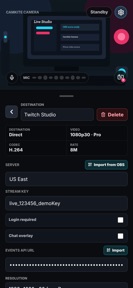


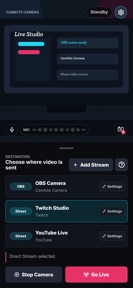
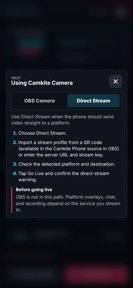
Camkite Camera for OBS is a utility that enables iOS devices to function as wireless camera sources for OBS Studio, featuring direct RTMP streaming and remote camera controls.
The App DNA
What makes this app unique?
Users hire Camkite to convert high-quality phone optics into professional streaming sources without the cost of dedicated capture hardware or complex wired setups.
For Live streamers and content creators who use OBS Studio and want to incorporate their phone as a high-quality, wireless camera source.
What does it look like?
Key features
Uses OMT protocol to stream phone camera feed directly into OBS Studio as a wireless source.
Adjusts camera settings like mute, flip, focus, torch, zoom, and exposure directly from the OBS interface.
Unlocks higher video resolutions, HDR, and watermark removal.
How much does it cost?
Freemium model gates high-fidelity technical features behind a subscription to monetize professional creator workflows.
Velocity
Steady developmentUX improvementsperformanceShow more...
With one release in the last 33 days, the app maintains a steady development cadence. The latest version focuses on technical refinements, specifically addressing iOS camera stability and interface labeling. Development appears centered on performance and UX improvements rather than rapid feature iteration. The current pace suggests a stable, maintenance-oriented update cycle.
Who built it?
User Sentiment
What do users think recently?
How are ratings & reviews evolving?
Not enough recent reviews to extract reliable themes yet.
Read the full review analysisCompetition
Competitive landscape for Camkite Camera for OBS
How's the Photo & Video market?
Camkite occupies the specialized OBS-peripheral segment, maintaining a 5-star rating on the App Store. The lack of direct competitors in the OBS-native wireless-camera space allows for a premium subscription gate on high-fidelity features.
Read the market outlookThe rivals identified
Unlock the deeper market read.
Access the full report for freeThe Analyst's Read
Key takeaways for Camkite Camera for OBS
Where is it heading?
The streaming-utility market is consolidating around integrated workflows, and Camkite's position as an OBS-native tool provides a defensible moat against generic camera apps. However, the reliance on the OBS plugin architecture means that any breaking change in OBS Studio will directly impact user retention, so the PM must prioritize platform-agnostic streaming modes to ensure long-term viability.
- The latest release improves camera stability and rear-camera selection, maintaining a steady release cadence of approximately one update per month.
- The app's reliance on the OBS plugin architecture necessitates constant maintenance, which limits the team's capacity for new feature expansion.
The SWOT
- OMT protocol integration enables low-latency wireless camera feeds for OBS users
- OBS dock controls provide centralized camera management without leaving the streaming interface
- Expansion into direct-to-platform streaming could capture users who find OBS too complex
- Integration with additional streaming software beyond OBS could broaden the addressable market
Next best moves
Invest in direct-to-platform RTMP streaming features because user reviews suggest a desire for mobile-first workflows → reduce reliance on OBS plugin stability
+ 1 more prioritized moveThe counter-intuitive read
The app's reliance on OBS is not a weakness but a strategic barrier…
Read the full takeSince the last report: The app expanded its utility by adding direct RTMP streaming, moving away from a strict dependency on OBS Studio to mitigate platform-specific technical risks.
Bottom line
Camkite secures a niche by bridging mobile hardware with professional streaming software, but its reliance on the OBS plugin architecture creates a fragile dependency, so the PM should prioritize diversifying into standalone streaming modes to hedge against plugin-breaking updates.
Unlock 2 critical frictions, 2 market threats, 1 more prioritized move and the analyst’s take.
Access the full report for freeFAQ
Is Camkite Camera for OBS free to use?
Does Camkite work with streaming software other than OBS?
Can I use my phone as a camera without OBS?
Sources
- [1] App Store
- [2] Developer website, source
Report last updated