


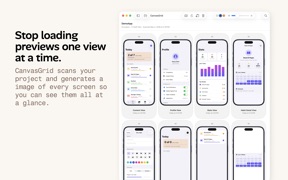


CanvasGrid is a developer tool for iOS that generates visual snapshots of Xcode projects to identify UI inconsistencies.
The App DNA
What makes this app unique?
Developers hire this tool to eliminate manual UI drift checks, allowing them to maintain visual parity across screens without leaving their coding workflow.
For iOS developers who prioritize code-first workflows and require visual validation to prevent UI inconsistencies.
What does it look like?
Key features
Generates visual representations of every screen in an Xcode project for centralized review
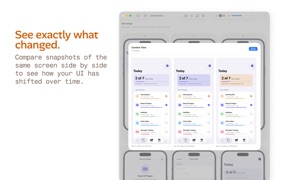
Side-by-side visual diffing of screens to identify layout inconsistencies between build versions
Enables setup via prompt injection for coding agents like Claude or Codex to automate snapshot generation
How much does it cost?
Paid model anchored at a $4.99 one-time fee, targeting individual developers with a low-friction entry point.
Velocity
Maintenance developmentperformanceUX improvementsShow more...
The app has released only one version in the observed window, resulting in a maintenance-level cadence. Development is currently focused on internal stability, code cleanup, and branding updates rather than new user-facing features. There is no evidence of live-ops activity or recurring content updates. The current trajectory suggests a focus on platform reliability and maintenance.
Who built it?
David Wilder
3 apps tracked · Developer Tools
 Uncorked: My Wine Journal
 Clients – Contacts & Projects
User Sentiment
What do users think recently?
How are ratings & reviews evolving?
Not enough recent reviews to extract reliable themes yet.
Read the full review analysisCompetition
Competitive landscape for CanvasGrid
How's the Developer Tools market?
CanvasGrid occupies a niche in the Developer Tools category, competing against high-utility data editors like Json Genie which command significantly higher review counts.
Read the market outlookThe rivals identified

By Tuyware
As a high-utility developer tool, Json Genie competes for the same screen time by offering deep data inspection capabilities that developers often require alongside UI layout verification.
- Massive user base and 18k+ reviews create a significant barrier to entry for new tools
- High-performance rendering engine handles massive JSON files that would crash less optimized mobile applications
- Mature feature set including flexible input sources and advanced formatting tools for data-heavy workflows
 Json Genie PREMIUM-JSON EditorContender
 SwiftyTerminal : TerminalContender
 Code - Editor Git and TerminalContender
Unlock the head-to-head verdict: where this rival wins, and where it loses.
Access the full report for freeThe Analyst's Read
Key takeaways for CanvasGrid
Where is it heading?
The developer tool market is shifting toward integrated AI-assisted workflows, which favors CanvasGrid's prompt-injection setup. However, the lack of a recurring revenue model leaves the app exposed to feature-parity competition from free IDE plugins.
- The tool launched recently with a specialized feature set, but lacks the community feedback loop necessary to gauge long-term adoption.
The SWOT
- Automated Xcode snapshotting reduces manual UI verification time
- Prompt-injection integration allows for rapid setup via coding agents
- Education partnerships for iOS development programs
- Integration with CI/CD pipelines for automated visual regression
Next best moves
Ship iPadOS multi-window support because it is a standard expectation for developer productivity tools → increase power-user retention.
The counter-intuitive read
The $4.99 price point is a liability, not an asset…
Read the full takeFeature gaps
iPadOS multi-window support (available in ShadowTerm but absent here) +1
Since the last report: The product strategy shifted from a design-to-code pivot toward defending the existing utility model by addressing iPadOS multitasking gaps and acknowledging threats from IDE-integrated plugins.
Bottom line
CanvasGrid solves a clear UI consistency pain point for iOS developers, but its one-time pricing model threatens long-term feature development, so the PM should prioritize iPadOS support to defend against high-performance terminal competitors.
Unlock 2 critical frictions, 2 market threats and the analyst’s take.
Access the full report for freeReport last updated