


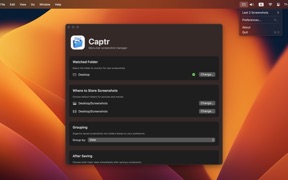


Captr is a macOS menu bar utility designed to automate the organization of screenshots and screen recordings. It monitors designated folders in real-time to move files automatically, preventing desktop clutter and streamlining file management.
Overview · Full Intel report in progress
The App DNA
What makes this app unique?
For Mac users who frequently capture screenshots and recordings and require an automated system to maintain file organization.
What does it look like?
Key features
Automatically moves new screenshots and recordings into user-specified folders upon creation.
Allows users to organize captures by application, date, or a combination of both.
Automatically recreates destination folders if they are accidentally deleted.
Provides a menu bar interface to preview and access up to 20 of the most recent captures.
How much does it cost?
Velocity
Who built it?
Ori Roniger
13+ apps tracked · Productivity
 Chodesh Hebrew Date & Calendar
 EyeSpy Mouse Eyes
 Tick-Dock
 MagicGlance
 MagicGlance Mouse
 EyeEase20
 Convertor
 Battery Plus Indicator
 Factastic
 TapWriter Pro
 MagicGlance Keyboard
 Sparkling Inspiration
User Sentiment
What do users think recently?
How are ratings & reviews evolving?
Not enough recent reviews to extract reliable themes yet.
Read the full review analysisCompetition
Competitive landscape for Captr
How's the Productivity market?
The rivals identified
The Analyst's Read
Key takeaways for Captr
Where is it heading?
Bottom line
Captr is a specialized utility that eliminates manual file management for macOS screenshots by providing automated sorting and quick-access previews.
Report last updated