


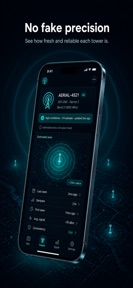


Cell Tower & Signal Finder is a utility app for iOS that maps cellular towers and measures connection quality for travelers and remote workers.
The App DNA
What makes this app unique?
Users report: The app removes the cognitive friction of misleading signal maps by providing honest confidence intervals and age data for every tower displayed.
For RV travelers, remote workers, and campers who require accurate signal data in variable locations.
What does it look like?
Key features
Visualizes cell towers with carrier and network-type filters.
Points a compass toward the nearest tower to assist physical location tracking.
Measures download, upload, and latency with a 0–100 Spot Score.
Displays tower confidence, sample count, and age to avoid misleading precision.
How much does it cost?
The app currently operates as a free utility with no visible ad-insertion or subscription gates.
Velocity
Active developmentnew contentUX improvementsinternationalizationShow more...
The app is currently in an active development phase, shipping two releases within the last 10 days. The latest update focuses on technical accuracy by surfacing local carrier data and MCC/MNC codes, alongside improvements to map responsiveness. This rapid cadence suggests a focused effort on refining core utility features shortly after the initial launch. Development is currently stable and centered on functional enhancements.
Who built it?
MUHAMMET USLU
13+ apps tracked · Utilities
 Sound Amplifier Hearing Aid
 Pupil Distance PD Meter
 Hidden Cam Detector
 Spam Text Blocker & Filter
 Card Scanner: TCG Values
 What to Wear: Outfit Planner
 PubMed AI Reader - PaperRounds
 Blutzucker Tracker Tagebuch
 Star Map: Sky & Star Finder
 Battery Health: Charge Care
 Ghost Detector: Spirit Box EMF
 Crosshair Maker & FPS Overlay
User Sentiment
What do users think recently?
How are ratings & reviews evolving?
Not enough recent reviews to extract reliable themes yet.
Read the full review analysisCompetition
Competitive landscape for Cell Tower & Signal Finder
How's the Utilities market?
Cell Tower & Signal Finder occupies the niche utility segment, focusing on data transparency rather than mass-market speed testing. The app's recent release and lack of rating volume indicate it is currently in the early acquisition phase.
Read the market outlookThe rivals identified
Unlock the deeper market read.
Access the full report for freeThe Analyst's Read
Key takeaways for Cell Tower & Signal Finder
Where is it heading?
The utility market is consolidating around high-accuracy, crowd-sourced data. Cell Tower & Signal Finder is currently advantaged by its transparent data model, but it must quickly transition to a user-verified platform to survive against established competitors.
- The high update cadence (two releases in 10 days) demonstrates active feature investment, which is essential for building trust in a new utility.
- The absence of user reviews makes it difficult to gauge market fit, creating a high-risk environment for early-stage growth.
The SWOT
- Compass-based navigation assists physical location tracking
- Data transparency builds trust with technical users
- Ad-free model removes user-experience friction
- Implement user-reporting to crowd-source tower accuracy
- Introduce premium offline-map tier for remote campers
- Integrate carrier-specific coverage maps for better targeting
Next best moves
Ship user-reporting feature because it creates a network effect for data accuracy → increase data reliability
+ 1 more prioritized moveThe counter-intuitive read
The lack of ads is a risk, not a strength…
Read the full takeSince the last report: The app's strategic outlook shifted from 'improving' to 'stable' as the developer acknowledged that the current ad-free, static-data model lacks the capital and reliability required for long-term growth.
Bottom line
Cell Tower & Signal Finder's commitment to data transparency creates a clear niche, but the lack of social proof leaves it vulnerable to established rivals. Prioritizing a user-feedback loop will turn the app into a living, crowd-verified utility.
Unlock 3 critical frictions, 2 market threats, 1 more prioritized move and the analyst’s take.
Access the full report for freeFAQ
Is Cell Tower & Signal Finder free to use?
How does Cell Tower & Signal Finder compare to standard speed test apps?
Does Cell Tower & Signal Finder work offline?
What alternatives should I consider for signal mapping?
Sources
- [1] App Store, source
Report last updated