


Clicking Counter Simple Tally
By PQD Apps
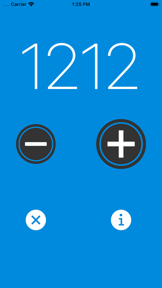


Clicking Counter Simple Tally is a manual counting utility for tracking repetitive tasks on iOS.
The App DNA
What makes this app unique?
It removes the cognitive friction of manual tallying for users who need simple, haptic-confirmed feedback during physical activities.
For Users requiring a simple, manual counting tool for tracking physical objects or repetitive tasks.
What does it look like?
Key features
Increments or decrements count via on-screen buttons.
Provides vibration and sound alerts for each click, toggleable in settings.
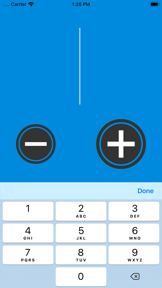
Allows users to edit the starting count to a specific integer.
How much does it cost?
The app is distributed as a free utility with no visible in-app purchases or subscription tiers.
Velocity
Dormant developmentopaqueShow more...
The app has reached a zombie state, with no updates or feature releases in 2,123 days. Development activity has been non-existent for over five years, indicating the project is no longer supported. There is no evidence of ongoing maintenance or operational activity.
Who built it?

User Sentiment
What do users think recently?
The recent review mood reads thrilled. Users appreciate the simple and clean interface allows users to track repetitive tasks without unnecessary digital friction and audible click confirmation provides consistent feedback that helps users maintain a steady rhythm during workouts.
How are ratings & reviews evolving?
What users say, by theme
- The simple and clean interface allows users to track repetitive tasks without unnecessary digital friction
- Audible click confirmation provides consistent feedback that helps users maintain a steady rhythm during workouts
- The lack of persistent state means users lose their current count when the application is closed
34 of 34 recent reviews analyzed · high confidence · Thrilled overall
Read the full review analysisUnlock 2 more frustration themes and 2 user requests, each backed by review evidence.
Access the full report for freeCompetition
Competitive landscape for Clicking Counter Simple Tally
How's the Utilities market?
Clicking Counter Simple Tally maintains a 4.49 rating across 65 total ratings, reflecting a stable but aging user base. The lack of updates since 2020 positions it as a legacy utility rather than a competitive modern tool.
Read the market outlookThe rivals identified
Unlock the deeper market read.
Access the full report for freeThe Analyst's Read
Key takeaways for Clicking Counter Simple Tally
Where is it heading?
The utility market is shifting toward persistent, data-aware tracking tools that offer historical insights. Clicking Counter Simple Tally remains static, which will accelerate user migration to alternatives that offer progress logging and background-audio compatibility.
- The five-year update gap signals that the developer has moved to maintenance-only mode, leaving the app vulnerable to modern, feature-rich competitors.
The SWOT
- Minimalist interface reduces cognitive friction for repetitive tasks
- Implement local history log to enable progress tracking
Next best moves
Ship persistent state storage because users report progress loss on exit → reduce churn
The counter-intuitive read
The app's lack of updates is its primary feature…
Read the full takeSince the last report: The market outlook has shifted from stable to declining, reflecting a more urgent assessment of the app's vulnerability to modern competitors that offer data persistence. This change is driven by the ongoing five-year development silence and the resulting user migration to feature-rich alternatives.
Bottom line
Clicking Counter Simple Tally relies on a minimalist design that currently fails to retain progress, which limits its utility for serious tracking. Adding persistent state would stabilize the user base and address the primary churn driver.
Unlock 2 critical frictions, 1 market threat and the analyst’s take.
Access the full report for freeFAQ
Is Clicking Counter Simple Tally free to use?
Does the app save my count if I close it?
Can I track my counting progress over time?
Sources
- [1] App Store
Report last updated