

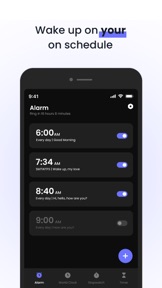


Clock : Alarm Clock & Timer is an Android utility app providing alarms, world clocks, stopwatches, and timers.
Product velocity
Maintenance
Daily rank 🇺🇸
—
Utilities
Sentiment
3.7
766k reviews
Nemesis
Alarmy - Alarm Clock & Sleep
The App DNA
What makes this app unique?
Users hire this app to manage daily schedules and wake-up routines, but the current reliability issues prevent it from fulfilling its primary job-to-be-done.
For Android users seeking a basic, all-in-one time management tool for daily scheduling, fitness tracking, and world time monitoring.
What does it look like?
Key features
Create, edit, and delete multiple alarms with customizable snooze durations and ringtones
View current time across multiple cities for remote scheduling and travel
Precision tracking for workouts and countdowns with lap recording
Removal of advertisements via monthly or yearly subscription
How much does it cost?
Freemium model uses ad-removal as the primary value proposition for paid tiers.
Velocity
Maintenance developmentUX improvementsplatform expansionShow more...
The app has released only two updates over the last two months across Android and iOS, resulting in a cadence of approximately 0.12 releases per week. This falls into the maintenance tier, as the development activity is limited to infrequent, platform-specific updates. The latest release focused on a design system update, but the overall lack of consistent, cross-platform feature delivery indicates a maintenance-focused development cycle.
Who built it?
Bhaskar Rao
6 apps tracked · Utilities
 Calculator: Math & Converter
 Draw - Trace & Sketch
 Doc Scanner-Scan Document
 GPS Map Camera – GeoTag
 Live Wallpaper - Wallpapers 4K
User Sentiment
What do users think recently?
Fresh user feedback skews frustrated. Users appreciate core utility of the clock and timer functions provides reliable time management for daily tasks, but report post-update alarm reliability issues cause missed wake-up times and silent notifications for many users.
How are ratings & reviews evolving?
What users say, by theme
- Core utility of the clock and timer functions provides reliable time management for daily tasks
- Post-update alarm reliability issues cause missed wake-up times and silent notifications for many users
50 of 50 recent reviews analyzed · high confidence · Frustrated overall
Read the full review analysisUnlock 2 more frustration themes and 2 user requests, each backed by review evidence.
Access the full report for freeCompetition
Competitive landscape for Clock : Alarm Clock & Timer
How's the Utilities market?
The app maintains a presence in the Android utility space, but its 3.7-star rating on 765,850 total ratings signals a performance gap against system-native defaults.
Read the market outlookThe rivals identified
By Sleep Tracker & Alarm Clock by Delightroom
With over 2 million ratings and a high-velocity release cadence, Alarmy dominates the alarm niche through aggressive gamification.
- Forces user engagement through mandatory photo, math, or shake-to-dismiss alarm challenges
- Integrates comprehensive sleep tracking and ambient soundscapes to capture the full nightly routine
- Maintains a high-frequency update cycle to ensure compatibility with evolving OS battery management

Unlock the head-to-head verdict: where this rival wins, and where it loses.
Access the full report for freeThe Analyst's Read
Key takeaways for Clock : Alarm Clock & Timer
Where is it heading?
The Android utility market is consolidating around high-reliability tools, leaving this app exposed due to its recent technical regressions. The PM must address the alarm failure rate immediately, or the app will lose its remaining user base to system-native alternatives that offer superior performance.
- Alarm reliability failures in the latest update trigger user churn, which compounds the rating drag already visible on Android.
- Increased UI friction in the alarm setup flow discourages daily usage, directly impacting the ad-impression inventory needed for the free tier.
The SWOT
- Consolidated feature set reduces app-switching for basic time management.
- Wearable integration to capture fitness-focused users; offline-first reliability improvements.
Next best moves
Rebuild alarm trigger logic because post-update reliability failures are the top complaint → restore daily active usage
+ 1 more prioritized moveThe counter-intuitive read
The app's biggest threat is not a rival alarm app, but the zero-latency…
Read the full takeFeature gaps
Mandatory engagement challenges (available in Alarmy but missing here) +1
Since the last report: The app has transitioned into a maintenance-focused development cycle, with recent updates causing critical reliability failures and negative sentiment shifts.
Bottom line
The app provides essential utility but fails at its core reliability promise, so the PM must prioritize alarm stability over new features to prevent total user migration to system-native defaults.
Unlock 1 critical friction, 1 market threat, 1 more prioritized move and the analyst’s take.
Access the full report for freeReport last updated