


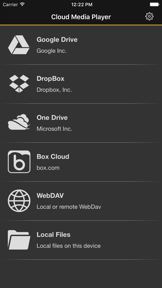



Cloud Media Player is a utility that enables users to stream and view media files directly from cloud storage services like Google Drive, Dropbox, and OneDrive without requiring local downloads. It supports a wide range of formats, including video, audio, PDF, and Office documents, while offering optional offline caching for remote access.
Overview · Full Intel report in progress
The App DNA
What makes this app unique?
For Users who need to access and play diverse media files stored across multiple cloud platforms on their mobile devices.
What does it look like?
Key features
Provides direct access to files stored on Google Drive, OneDrive, Dropbox, Box, Put.io, and WebDAV-compatible NAS.
Supports playback and viewing of various video, audio, PDF, image, and Office document formats.
Allows users to download files to their local device for viewing when an internet connection is unavailable.
Includes specialized gestures within the audio and video players to facilitate easier navigation and transcription.
How much does it cost?
Velocity
Dormant developmentShow more...
4 versions in history. Development pace: zombie.
Who built it?
Dayana Networks
13+ apps tracked · Utilities
 Voice Record Pro 7 Full
 Voice Record Pro
 My Altitude
 Dish Align
 Voice Record Pro 7
 Farda Station - ایستگاه فردا
 Network Utilities & Analyzer
 Jigsaw Puzzle Game Pro Classic
 NSLookup
 iMP3
iMP3 Video Record Pro
 Control Panel Plus
User Sentiment
What do users think recently?
How are ratings & reviews evolving?
Not enough recent reviews to extract reliable themes yet.
Read the full review analysisCompetition
Competitive landscape for Cloud Media Player
How's the Utilities market?
The rivals identified
The Analyst's Read
Key takeaways for Cloud Media Player
Where is it heading?
Bottom line
While the app offers a convenient, ad-free way to access cloud-based media, users report significant stability issues and a lack of essential playback features like playlists and shuffle.
Report last updated