


Color Palette: Photo to Colors
By Spruzzo Labs


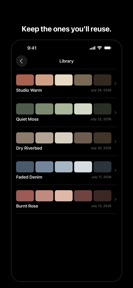

Color Palette: Photo to Colors is a design utility for iOS that extracts color palettes from photos and generates code-ready color values.
The App DNA
What makes this app unique?
The app removes the manual friction of sampling colors from images and calculating contrast ratios, which designers and developers otherwise perform using multiple disparate tools.
For Designers, developers, and hobbyists who need to extract or generate color palettes for creative projects or code implementation.
What does it look like?
Key features
Extracts five colors from any photo or library image with manual sampling via drag-to-select.
Calculates contrast ratios against black and white backgrounds with AA and AAA compliance indicators.
Exports palettes as SwiftUI, CSS variables, Tailwind config, or Adobe ASE files.
How much does it cost?
The one-time purchase model for professional export formats creates a clear conversion lever for developers who need code-ready assets.
Velocity
Maintenance developmentopaqueShow more...
The app currently ships at a maintenance cadence, with only one release recorded in the analyzed window. With the latest version released 65 days ago, development activity remains minimal. There is no evidence of new features or live operations, and the lack of release notes provides no insight into the developer's roadmap. The current pace suggests a focus on basic stability rather than active product evolution.
Who built it?
Spruzzo Labs
7 apps tracked · Graphics & Design
 Tidal Arc: Tide Times High Low
 Book Catalog
 Solar Arc: Golden Hour Tracker
 BiteTime – Best Fishing Times
 Scatto: Manual RAW Camera
 Body Log: Calisthenics
User Sentiment
What do users think recently?
How are ratings & reviews evolving?
Not enough recent reviews to extract reliable themes yet.
Read the full review analysisCompetition
Competitive landscape for Color Palette: Photo to Colors
How's the Graphics & Design market?
Color Palette: Photo to Colors targets the professional design utility space, differentiating itself from casual color pickers through accessibility-first contrast grading. The lack of a subscription model positions it as a low-friction alternative for users who prioritize one-time ownership over recurring costs.
Read the market outlookThe rivals identified
Unlock the deeper market read.
Access the full report for freeThe Analyst's Read
Key takeaways for Color Palette: Photo to Colors
Where is it heading?
Users report: The design utility market is consolidating around tools that offer direct integration into developer workflows, such as CSS and Tailwind exports. Color Palette: Photo to Colors is well-positioned to capture this segment if it addresses the current lack of cloud-sync, which remains a primary friction point for professional adoption.
- The app maintains a maintenance-only release cadence, which suggests a stable but slow feature development path.
The SWOT
- Accessibility contrast grading (AA/AAA) establishes a professional utility barrier
- One-time purchase model removes recurring subscription friction
- Localized pricing in high-ARPU markets could capture professional users
Next best moves
Ship cloud-sync for saved palettes because it is a standard expectation for professional design tools → increase retention
The counter-intuitive read
The absence of a subscription model is a…
Read the full takeBottom line
Color Palette: Photo to Colors provides a clear utility for professional designers, but the lack of cloud-sync limits its long-term value for power users. Investing in cross-device synchronization would secure its position against more integrated design suites.
Unlock 2 critical frictions, 1 market threat and the analyst’s take.
Access the full report for freeFAQ
Is Color Palette: Photo to Colors suitable for professional design work?
Does Color Palette: Photo to Colors require a subscription?
What are the main limitations of the free version?
What is a good alternative for multi-device palette management?
Sources
- [1] App Store
Report last updated