



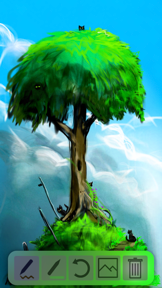


Asketch is a gesture-based digital sketch pad for beginners and artists on iOS.
The App DNA
What makes this app unique?
Users hire Asketch for rapid, distraction-free sketching that mimics traditional paper, allowing for immediate creative capture without the overhead of complex professional suites.
For Beginners learning to draw and advanced artists seeking a portable, tonal digital sketch pad.
What does it look like?
Key features
Adjusts drawing focus based on the surface area of the finger contact on the screen.
Allows users to pick up, resize, and rotate drawings using pinch gestures.
Supports variable stroke thickness on iPhones equipped with pressure-sensitive hardware.
How much does it cost?
Paid model at $1.99 provides full access to the toolset without recurring subscription or ad-based monetization.
Velocity
Dormant developmentShow more...
5 versions in history. Development pace: zombie.
Who built it?
User Sentiment
What do users think recently?
The recent review mood reads mixed. Users appreciate minimalist interface design allows users to focus on sketching without distracting menu clutter.
How are ratings & reviews evolving?
What users say, by theme
- Minimalist interface design allows users to focus on sketching without distracting menu clutter
- Hidden gesture-based controls frustrate users who prefer standard on-screen menu navigation
49 of 49 recent reviews analyzed · high confidence · Mixed overall
Read the full review analysisUnlock 1 user request, each backed by review evidence.
Access the full report for freeCompetition
Competitive landscape for Asketch
How's the Graphics & Design market?
Asketch holds a #57 Paid rank in the US and maintains top 20 positions in markets like Singapore and Sweden. The consistent international ranking despite a $1.99 price point indicates a stable, niche demand for minimalist creative tools.
Read the market outlookThe rivals identified
By Appycron Interactive e.K.
Both apps target the digital illustration market, but Canvas Max captures casual users through a free-to-use model and infinite canvas capabilities that contrast with the fixed-canvas, paid-only approach of Asketch.
- Infinite canvas and zoom capabilities allow for non-linear composition, whereas Asketch relies on a fixed-canvas gesture system.
- Vector-based drawing tools ensure crisp design scaling, while Asketch focuses on tonal response for traditional sketching.
- Free-to-use pricing model lowers the barrier to entry compared to the upfront cost of Asketch.



Unlock the head-to-head verdict: where this rival wins, and where it loses.
Access the full report for freeThe Analyst's Read
Key takeaways for Asketch
Where is it heading?
The mobile sketching market is shifting toward AI-assisted generation and social-first workflows, which puts pressure on manual-only tools like Asketch. To remain relevant, the app must bridge the gap between its minimalist core and the modern expectation for cloud-connected, accessible creative workflows.
- Hidden gesture controls in the latest release continue to drive user frustration, which limits the app's appeal to casual beginners.
- The recent addition of Under Drawing support demonstrates active feature investment, signaling the developer is not in maintenance mode.
The SWOT
- Gesture-based input provides a unique tactile moat
- Minimalist design sustains high-fidelity focus
- Paid model avoids ad-based distraction
- Implement iCloud sync to prevent data loss
- Add in-app tutorial to lower learning curve
- Expand color management tools
Next best moves
Ship in-app tutorial because gesture-based controls are the #1 complaint → reduce churn
+ 1 more prioritized moveThe counter-intuitive read
The app's minimalist, gesture-only interface is not a…
Read the full takeFeature gaps
Cloud storage integration (available in Procreate and ibis Paint X) +2
Since the last report: The app has formalized its pricing, clarified its competitive positioning as a gesture-based differentiator, and gained visibility into user sentiment and market threats.
Bottom line
Asketch succeeds by offering a focused, minimalist canvas, but the steep learning curve of its gesture system threatens long-term retention, so the PM must prioritize an onboarding tutorial to convert new users into loyalists.
Unlock 3 critical frictions, 3 market threats, 1 more prioritized move and the analyst’s take.
Access the full report for freeReport last updated