


Cue Lab | Shots & Layouts


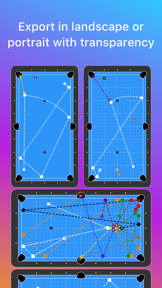
Cue Lab is a specialized diagramming tool for pool and billiards that allows users to map out shots, drills, and full table layouts. It features gesture-based drawing, live path recording, and physics-based ball movement to help players visualize complex sequences and spin techniques.
Overview · Full Intel report in progress
The App DNA
What makes this app unique?
For Pool and billiards players looking to document training drills, analyze shot paths, and create instructional layouts.
What does it look like?
Key features
Users can draw lines and paths with swipes to simulate ball movement, including bounces off rails and other balls.
Includes tools to bend pathways for demonstrating extreme spin and massé shots, alongside target zones for positioning.
Provides pre-set configurations for 8-ball, 9-ball, 10-ball, and 14.1 straight pool games.
Supports saving diagrams to the device camera roll or sharing directly to messaging and photo apps.
How much does it cost?
Velocity
Active developmentShow more...
5 versions in history. Development pace: active.
Who built it?
Bright Mediums
2 apps tracked · Sports
 Pacer Fitness - Interval Timer
User Sentiment
What do users think recently?
How are ratings & reviews evolving?
Not enough recent reviews to extract reliable themes yet.
Read the full review analysisCompetition
Competitive landscape for Cue Lab | Shots & Layouts
How's the Sports market?
The rivals identified

By Bijjol Rambhia Kiran
Both applications target billiards players needing to document training drills and shot paths, creating direct competition for the same instructional use cases.
- Pool Shots includes animation playback for shot sequences, while Cue Lab focuses on physics-based ball movement.
- Pool Shots utilizes a proprietary file format for sharing, whereas Cue Lab provides standard export options.


Unlock the head-to-head verdict: where this rival wins, and where it loses.
Access the full report for freeThe Analyst's Read
Key takeaways for Cue Lab | Shots & Layouts
Where is it heading?
Bottom line
While the app offers powerful diagramming capabilities, user feedback highlights a significant lack of onboarding, tutorials, or instructional guidance for new users.
Report last updated