

Chroma Key is a mobile green screen utility for iPhone and iPad that provides tracking marks and color-toggled backgrounds for VFX production.
The App DNA
What makes this app unique?
Users hire Chroma Key to isolate screen content for post-production workflows where dedicated, high-contrast tracking marks are required for alignment.
For Independent filmmakers, video editors, and content creators requiring mobile-based green screen tools for VFX production.
What does it look like?
Key features
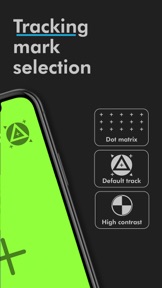
Selection of default or high-contrast tracking marks for VFX alignment during filming.
Toggle between green and blue screen backgrounds with single-tap adjustment.
How much does it cost?
Low-cost, one-time purchase model positions the app as an accessible utility for independent creators.
Velocity
Dormant developmentperformanceUX improvementsShow more...
The app has entered a zombie state, with no updates shipped in the last 462 days. Development activity is effectively non-existent across both Android and iOS platforms. The last release focused on camera controls and background removal, but the lack of subsequent maintenance or feature expansion indicates the project is no longer actively supported.
Who built it?
David Perez
3 apps tracked · Photo & Video
 CineBag
 Valle del Almanzora | Turismo
User Sentiment
What do users think recently?
Review voice lately leans frustrated. Users appreciate the application provides a functional tool for isolating desktop or laptop screens during post production.
How are ratings & reviews evolving?
What users say, by theme
- The application provides a functional tool for isolating desktop or laptop screens during post production
- Users report the application lacks clear instructions on how to operate the core feature set
4 of 4 recent reviews analyzed · limited sample
Read the full review analysisUnlock 1 more frustration theme, each backed by review evidence.
Access the full report for freeCompetition
Competitive landscape for Chroma Key | Green Screen
How's the Photo & Video market?
Chroma Key occupies a niche utility segment, priced at a one-time $0.99 fee. The lack of updates since April 2025 limits its competitive standing against free, high-scale editors that dominate the category.
Read the market outlookThe rivals identified
By 丽譞 牛
Both applications target creators requiring video background replacement, but Video Background Eraser eliminates the need for physical green screens, directly challenging the core utility of Chroma Key.
- Video Background Eraser provides automated background removal, while Chroma Key requires manual filming with green screens.
- Video Background Eraser includes 800+ background templates, whereas Chroma Key lacks built-in assets for scene replacement.
- Video Background Eraser supports alpha channel exports, offering greater flexibility for professional post-production workflows.
 Veescope Live Green Screen AppContender
 Green Screen Live Video RecordContender
 Teleplay - Green Screen StudioContender
 Green Screen-Background EditorContender
 Green Screen by Do InkContender
 Video Background ChangerContender
 Veescope Green Screen FullContender
 backAR Green ScreenContender

Unlock the head-to-head verdict: where this rival wins, and where it loses.
Access the full report for freeThe Analyst's Read
Key takeaways for Chroma Key | Green Screen
Where is it heading?
The mobile video utility market is consolidating around free, high-scale editors that offer automated background removal. Chroma Key's lack of updates since April 2025 leaves it exposed, as it fails to provide the advanced keying capabilities that professional users now expect as standard.
- The 15-month development silence indicates a maintenance-only posture, which erodes competitive standing against high-velocity rivals like CapCut.
- User confusion regarding core operations, combined with a lack of feature depth, accelerates churn pressure into the next quarter.
The SWOT
- Dedicated tracking mark selection facilitates VFX alignment
- Localized tutorials could resolve top-cited user confusion
Next best moves
Ship an onboarding overlay because user confusion regarding interface operation is the top complaint → increase user retention.
The counter-intuitive read
The app's minimalist, single-purpose nature is its primary asset…
Read the full takeFeature gaps
Multi-track magnetic timeline editing (available in LumaFusion) +1
Bottom line
Chroma Key provides a specific, functional utility for mobile VFX, but its 15-month update drought and lack of advanced features make it a legacy tool. The PM should prioritize a basic onboarding overlay to address user confusion, as the current interface friction is the primary churn driver.
Unlock 2 critical frictions, 1 market threat and the analyst’s take.
Access the full report for freeFAQ
Is Chroma Key suitable for professional video editing?
How does Chroma Key compare to CapCut?
Are there free alternatives to Chroma Key?
Sources
Report last updated