




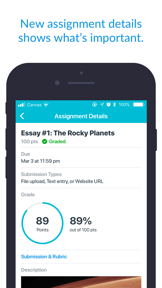
Canvas by Instructure is a leading mobile LMS for students in K-12 and Higher Ed, serving 40M+ users. Its value proposition centers on 'Student-Centered Success' through unique tools like 'What-If' grade simulations and SpeedGrader integration. However, the app is currently facing a significant decline in user satisfaction due to technical regressions in session persistence and To-Do list functionality, causing it to slip to #13 in its category.
The App DNA
What makes this app unique?
For Students enrolled in educational institutions that utilize the Canvas Learning Management System.
What does it look like?
Key features
Simulate future assignment scores to help students plan study goals.
Allows teachers to annotate and grade student submissions directly within the app.
Download full courses to study without an internet connection.
VPAT 2.2 compliant design to ensure inclusive learning for everyone.
How much does it cost?
The app serves as a free mobile extension of the enterprise-grade Canvas LMS platform, focusing on user retention within the existing ecosystem rather than direct monetization.
Velocity
Active developmentUX improvementsperformanceinternationalizationShow more...
Development is currently active, with a consistent cadence of major feature releases occurring approximately every 4 to 6 weeks. The team is balancing new feature rollouts, such as document scanning and dashboard customization, with ongoing platform stability and UI refinements. The trend indicates a stable, high-frequency development cycle focused on both user experience and functional expansion across iOS and Android platforms.
Who built it?
Instructure
4 apps tracked · Education
 Canvas Parent
 Canvas Teacher
 Instructure Events
User Sentiment
What do users think recently?
Review voice lately leans frustrated. Users appreciate centralized course management, but report persistent authentication issues.
How are ratings & reviews evolving?
What users say, by theme
- Centralized Course Management
Unlock 1 more frustration theme, each backed by review evidence.
Access the full report for freeCompetition
Competitive landscape for Canvas by Instructure
How's the Education market?
The rivals identified

By Moodle Pty Ltd.
Both apps serve the same academic and workplace audience by providing mobile access to institutional learning management systems, creating direct competition for student engagement.
- Moodle offers white-label licensing for branded institutional apps, whereas Canvas maintains a unified platform experience.
- Moodle lacks native file previewing, forcing local downloads, while Canvas integrates SpeedGrader for direct instructor feedback.


Unlock the head-to-head verdict: where this rival wins, and where it loses.
Access the full report for freeThe Analyst's Read
Key takeaways for Canvas by Instructure
Where is it heading?
- Upset user base due to v8.9.0/v8.7.1 regressions in authentication and To-Do lists.
- Rankings show a slight decline (#13 Free, ↓3) in the US Education category.
- Active feature investment continues with recent additions like physical document scanning (Mar 2026).
The SWOT
- Massive user base (40M+ learners)
- Unique 'What-If' grade simulation tool
- VPAT 2.2 Accessibility compliance
- Robust offline course access
- Workload visualization tools (mental health focus)
- Synchronous communication/chat expansion
- Multimodal submission tools for K-6
Next best moves
Resolve session persistence and auto-logout bugs.
+ 2 more prioritized movesFeature gaps
Centralized 'Activity Stream' (available in Blackboard) +3
Since the last report: Canvas has transitioned from a stable, standard-feature app to one experiencing significant technical regressions, leading to a negative sentiment shift and increased user churn to mobile browsers.
Bottom line
If I were the PM, I would halt new feature development (like the Learning Library) to focus exclusively on fixing the authentication and To-Do list regressions. While Canvas has superior student-centric tools like 'What-If' grades, the current technical instability is actively driving users to mobile browsers, which threatens the long-term viability of the native app.
Unlock 4 critical frictions, 3 market threats, 2 more prioritized moves and the analyst’s take.
Access the full report for freeFAQ
Can I use the Canvas app to study without internet?
How does Canvas compare to the Blackboard app?
Why does the Canvas app keep logging me out?
Is there a better way to use Canvas if the app crashes?
Report last updated