


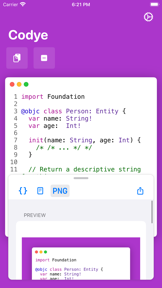


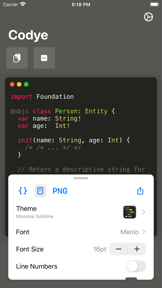


Codye is a desktop utility for developers that converts code snippets into visual formats like PNG, HTML, and RTF.
The App DNA
What makes this app unique?
The tool removes the manual friction of formatting code for slides and blogs, allowing users to maintain consistent visual branding across technical documentation.
For Developers and technical writers needing high-quality code visuals for presentations, blogs, or documentation.
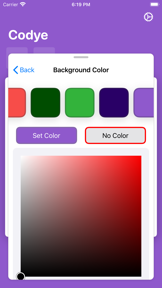
What does it look like?
Key features
Provides support for over 180 languages and 100 visual themes, serving as the primary visual differentiator.
Enables full application control via shortcuts, catering to power users who prioritize speed.
Automates snippet generation workflows via system-level shortcuts, reducing time-to-publish.
How much does it cost?
Codye is currently listed as free with no visible in-app purchases or subscription tiers, limiting its direct revenue potential.
Velocity
Steady developmentShow more...
Who built it?
Dario Roa
2 apps tracked · Developer Tools
 WallShift - Wallpaper Schedule
User Sentiment
What do users think recently?
How are ratings & reviews evolving?
Not enough recent reviews to extract reliable themes yet.
Read the full review analysisCompetition
Competitive landscape for Codye
How's the Developer Tools market?
Codye operates as a specialized utility within the Developer Tools space, maintaining a 4.0 rating across 23 reviews. Its focus on keyboard-first automation distinguishes it from web-based snippet generators that rely on mouse-heavy interfaces.
Read the market outlookThe rivals identified
Unlock the deeper market read.
Access the full report for freeThe Analyst's Read
Key takeaways for Codye
Where is it heading?
The market for code visualization is consolidating around web-based tools that offer instant access and cloud-sync. Codye's desktop-first approach is currently a barrier to adoption for users who prioritize mobility and team-based collaboration, suggesting a need to pivot toward cloud-integrated workflows to remain relevant.
- The release cadence remains in maintenance mode, which signals a stable utility rather than an active growth product.
- The absence of cloud-sync features prevents Codye from becoming a core part of professional documentation workflows, limiting its long-term retention.
The SWOT
- Keyboard-first workflow enables rapid snippet generation for technical power users
- Integrating with documentation platforms like Notion could create a distribution barrier against standalone editors
Next best moves
Ship cloud-sync for snippets because the lack of multi-device support is a barrier for professional teams → increase retention
The counter-intuitive read
Codye's desktop-only architecture is a liability in a web-first market…
Read the full takeSince the last report: Codye has shifted from a general utility to a maintenance-mode desktop tool, with its keyboard-first workflow now positioned as a primary differentiator against web-based competitors. The lack of cloud-sync is now identified as a critical barrier to professional adoption.
Bottom line
Codye's keyboard-first workflow provides a distinct utility for power users, but the lack of cloud-sync limits its role in professional documentation pipelines. Prioritizing multi-device access would unlock higher utility for technical writers who frequently switch workstations.
Unlock 1 critical friction, 1 market threat and the analyst’s take.
Access the full report for freeFAQ
Is Codye suitable for professional documentation?
How does Codye compare to web-based snippet generators?
Does Codye require an internet connection to work?
What are some alternatives to Codye?
Sources
- [1] App Store, source
Report last updated