


eDrawings Pro is a professional CAD collaboration app for iOS that enables viewing and markup of SolidWorks and DWG files.
Product velocity
Intense
Daily rank 🇺🇸
#80
Productivity · paid
Sentiment
2.1
25 reviews
Nemesis

DWG FastView-CAD Viewer&Editor
The App DNA
What makes this app unique?
Engineers hire the app to review proprietary CAD data in the field, as it provides the only mobile-native way to inspect complex assembly configurations without a workstation.
For Engineers, manufacturing supervisors, and design teams who need to review and annotate CAD files on mobile devices.
What does it look like?
Key features
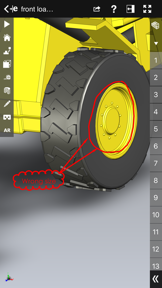
View 3D models in 1:1 scale within real-world environments using device camera
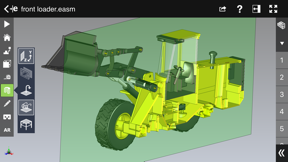
View model cross-sections in XY, YZ, or ZX planes with interactive slider controls
Create text notes, dimensions, and freehand notations saved within the CAD file
How much does it cost?
Paid model anchored at $9.99, targeting professional users who require mobile access to proprietary CAD formats.
Velocity
Intense developmentShow more...
5 versions in history. Development pace: intense.
Who built it?
Dassault Systemes SolidWorks
2 apps tracked · Productivity
 eDrawings
User Sentiment
What do users think recently?
The recent review mood reads frustrated. Users appreciate mobile viewing capability allows for remote cad data review on the go.
How are ratings & reviews evolving?
What users say, by theme
- Mobile viewing capability allows for remote CAD data review on the go
- Frequent application crashes when attempting to open large assembly files
49 of 49 recent reviews analyzed · high confidence · Frustrated overall
Read the full review analysisUnlock 1 more frustration theme and 1 user request, each backed by review evidence.
Access the full report for freeCompetition
Competitive landscape for eDrawings Pro
How's the Productivity market?
eDrawings Pro holds a #45 rank in the US Productivity category, but its 2.08 rating indicates that the current value proposition is failing to meet professional expectations. The gap between its niche utility and the high crash frequency signals that the app is losing its competitive standing to more stable, multi-format viewers.
Read the market outlookThe rivals identified
By Gstarsoft Co., Ltd
This app is the dominant market leader in the CAD viewing niche, boasting nearly 100,000 reviews and a high-frequency update cycle that directly challenges eDrawings Pro's professional utility.
- Offers a comprehensive suite of editing and annotation tools that eDrawings Pro lacks for mobile users.
- Supports a broader range of file formats including native DWG and DXF beyond the SolidWorks ecosystem.
- Maintains a high-velocity release cadence with two updates in the last six months to ensure platform compatibility.

Unlock the head-to-head verdict: where this rival wins, and where it loses.
Access the full report for freeThe Analyst's Read
Key takeaways for eDrawings Pro
Where is it heading?
The CAD viewer market is consolidating around multi-format, stable, and cloud-integrated tools, leaving eDrawings Pro exposed. Without a shift from maintenance-mode bug fixes to a robust rendering engine upgrade, the app will continue to lose its professional user base to more versatile competitors.
- Frequent rendering crashes on large assembly files erode professional trust, which compounds the rating drag already visible on the platform.
- Recent updates focused on stability, but no feature expansion suggests the team is in maintenance mode rather than growth.
The SWOT
- Deep SolidWorks ecosystem integration provides high-fidelity rendering of proprietary assembly configurations
- AR-based 1:1 scale design review functions as a differentiator for field-based engineering teams
- Native cloud storage integration would resolve manual file transfer friction
- Markerless AR implementation would improve usability for field-based design review
Next best moves
Audit rendering engine for large assembly files because crash reports are the #1 complaint → restore baseline usability
+ 1 more prioritized moveThe counter-intuitive read
The app's reliance on a paid-only model is…
Read the full takeFeature gaps
Mobile-native CAD editing (available in DWG FastView but absent here) +1
Since the last report: The report reflects a transition from a neutral feature-focused profile to a critical assessment of declining stability and competitive erosion.
Bottom line
eDrawings Pro provides essential SolidWorks viewing, but its persistent instability on large files threatens the professional user base, so the team must prioritize rendering engine performance over new feature development to stop the churn.
Unlock 3 critical frictions, 2 market threats, 1 more prioritized move and the analyst’s take.
Access the full report for freeReport last updated