


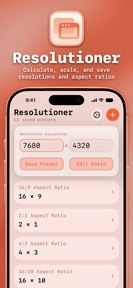


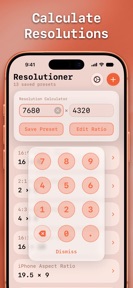


Resolutioner is a utility app for calculating aspect ratios and managing resolution presets on iOS, iPadOS, and macOS.
The App DNA
What makes this app unique?
It removes the cognitive friction of manual dimension calculation for professionals working across varied display environments.
For Developers, designers, and microscopists requiring precise display dimension management.
What does it look like?
Key features
Calculates missing dimensions based on user-defined ratios, filling a gap in standard calculator utilities.
Saves specific configurations with custom labels for professional project management.
Synchronizes presets across Apple devices, reducing the need for manual data entry in multi-device workflows.
How much does it cost?
The app is distributed as a free utility with no visible monetization gates or subscription tiers.
Velocity
Dormant developmentUX improvementsperformanceShow more...
Resolutioner has been inactive for 375 days, placing it firmly in the zombie category. The most recent update addressed a UI layout issue and renamed a feature, but no further development has been observed since July 2025. With no releases in the last year, the app shows no signs of active maintenance or ongoing support.
Who built it?
Sun Apps
4 apps tracked · Developer Tools
 School Assistant – Planner
 FFmpeg Command Generator
 The Ultimate Counter
User Sentiment
What do users think recently?
Recent user voice shows an excited sentiment. Users appreciate microscopists find the tool highly convenient for quick calculations while working in the field and graphic designers value the ability to store custom dimension presets for various design projects.
How are ratings & reviews evolving?
What users say, by theme
- Microscopists find the tool highly convenient for quick calculations while working in the field
- Graphic designers value the ability to store custom dimension presets for various design projects
- The aspect ratio calculator provides precise automatic dimensioning that is missing in rival applications
- Users report that resolution and field of view changes do not apply correctly within games
40 of 40 recent reviews analyzed · high confidence · Excited overall
Read the full review analysisUnlock 1 more frustration theme and 1 user request, each backed by review evidence.
Access the full report for freeCompetition
Competitive landscape for Resolutioner
How's the Developer Tools market?
Resolutioner holds a niche utility position, with a 4.44 rating across 609 total platform reviews. The lack of updates for over a year, however, creates a widening gap between its static feature set and the evolving requirements of professional developer tools.
Read the market outlookThe rivals identified

By Tihomir Radev
Both applications target technical users requiring resolution and display dimension calculations, creating direct competition for the same professional and enthusiast user base.
- Resolutioner includes iCloud sync for multi-device persistence, while Megapixel Calculator lacks cloud-based data storage.
- Resolutioner supports custom dimension presets for design projects, whereas Megapixel Calculator focuses on DPI and megapixel conversions.

Unlock the head-to-head verdict: where this rival wins, and where it loses.
Access the full report for freeThe Analyst's Read
Key takeaways for Resolutioner
Where is it heading?
The professional utility market is consolidating around editors that offer integrated version control and multi-tab workflows. Resolutioner's static feature set leaves it exposed to these more comprehensive tools, and without a return to active development, the app will likely see continued erosion of its professional user base.
- The 12-month release dormancy signals a maintenance-only posture, which erodes professional trust compared to active rivals like Spck Editor.
- Persistent user complaints regarding game resolution application indicate a feature-expectation gap that remains unaddressed, driving negative sentiment among new users.
The SWOT
- Offline-first utility functions as a barrier to cloud-dependent rivals
- iCloud sync provides multi-device persistence for professional workflows
- Drag-and-drop preset organization would address top user requests
- Adding direct integration with design software could increase professional utility
Next best moves
Audit UI for resolution submission because users report confusion finalizing inputs → improve onboarding conversion
+ 1 more prioritized moveThe counter-intuitive read
The app's lack of updates is its primary retention risk…
Read the full takeFeature gaps
Git client integration (available in Spck Editor but absent here) +1
Since the last report: Resolutioner has entered a state of total development stagnation, with the primary change being the solidification of user frustration regarding the app's inability to apply resolution settings to external games.
Bottom line
Resolutioner's offline utility retains a core professional base, but the year-long development silence risks total churn to active rivals like Spck Editor. A targeted UI refresh to resolve input confusion would stabilize the current user base while the team evaluates a long-term feature roadmap.
Unlock 2 critical frictions, 2 market threats, 1 more prioritized move and the analyst’s take.
Access the full report for freeFAQ
Is Resolutioner suitable for professional design work?
How does Resolutioner compare to Textastic?
Does Resolutioner work for changing game resolutions?
What are some alternatives for developers?
Sources
- [1] App Store, source
Report last updated