


Awesome Calendar
By YunaSoft

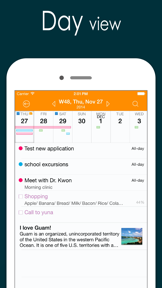


Awesome Calendar is a productivity app for iOS that aggregates multiple calendar sources, tasks, and notes into a single visual interface.
The App DNA
What makes this app unique?
It serves users who prefer a one-time purchase model over recurring subscriptions, removing the financial friction of modern productivity tools.
For Professionals and individuals seeking an all-in-one productivity tool to manage schedules, tasks, and personal diaries in a single interface.
What does it look like?
Key features
Aggregates events from iCloud, Google Calendar, Exchange, and CalDAV into a single interface.
Allows users to attach photos to daily notes and diary entries within the calendar view.
Automatically carries over incomplete tasks to the next day until marked as finished.
How much does it cost?
The flat-fee model at $9.99 positions Awesome Calendar as a one-time investment, providing a clear value proposition against subscription-based rivals.
Velocity
Dormant developmentShow more...
5 versions in history. Development pace: zombie.
Who built it?
YunaSoft
9 apps tracked · Productivity
 Awesome Calendar Lite
 WidgetCal-Calendar Widget
 Awesome Calendar 2
 EverCal - Family Organizer
 4our Dots - Dots and Boxes
 한음달-한국인에게 꼭 맞는 음력달력, 캘린더
 Kid Savanna
 10 Minutes Diet
User Sentiment
What do users think recently?
Fresh user feedback skews frustrated. Users appreciate color coding events by category helps families and busy professionals track multiple schedules effectively and one-time purchase model provides a clear value proposition compared to modern subscription-based calendar alternatives.
How are ratings & reviews evolving?
What users say, by theme
- Color coding events by category helps families and busy professionals track multiple schedules effectively
- One-time purchase model provides a clear value proposition compared to modern subscription-based calendar alternatives
- Search functionality provides quick access to specific past events and day-of-week details
- Intermittent data loss and disappearing calendar events erode trust in the app as a reliable scheduler
49 of 49 recent reviews analyzed · high confidence · Frustrated overall
Read the full review analysisUnlock 2 more frustration themes and 3 user requests, each backed by review evidence.
Access the full report for freeCompetition
Competitive landscape for Awesome Calendar
How's the Productivity market?
Awesome Calendar holds a niche position as a paid-upfront productivity tool in a market dominated by subscription-based rivals. The lack of updates for over 1,500 days signals a maintenance-mode posture that leaves the app exposed to competitors with active development cycles.
Read the market outlookThe rivals identified

By Readdle Technologies Limited
Both apps target professionals requiring integrated task and calendar management, but they diverge on monetization models: one-time purchase versus subscription.
- Natural language input enables rapid event creation, whereas Awesome Calendar requires manual field entry.
- Integrated task manager syncs with Apple Reminders, while Awesome Calendar lacks native system-level task integration.
- Freemium model lowers the barrier to entry compared to the $9.99 upfront cost of Awesome Calendar.
 Calendar Op.2: Planner & DiaryContender
 Calendar Widget & PlannerContender
 Calalarm CalendarContender
 Calendar Widget - Schedule AppContender
 iCalendarContender
 BusyCal: Calendar & TasksContender
 CalendarLifeContender
 Seamless Calendar - PlannerContender


Unlock the head-to-head verdict: where this rival wins, and where it loses.
Access the full report for freeThe Analyst's Read
Key takeaways for Awesome Calendar
Where is it heading?
Users report: The productivity market is consolidating around cloud-native tools that offer seamless cross-device synchronization. Awesome Calendar's failure to address data persistence issues leaves it exposed, and the lack of updates suggests the developer is not prioritizing the infrastructure required to retain professional users.
- The absence of major updates for over 1,500 days signals a maintenance-mode posture that prevents the app from competing with modern feature-rich rivals.
- Persistent reports of data loss and sync failures erode trust, which compounds the churn pressure as users migrate to cloud-native alternatives.
The SWOT
- One-time purchase model removes recurring subscription friction
- Color-coded visual hierarchy supports complex multi-schedule management
- Cloud-sync implementation would address the primary churn driver
- Home screen widget integration would improve daily utility
Next best moves
Implement cloud-based synchronization because data loss is the top-cited churn driver → reduce long-term user abandonment
+ 1 more prioritized moveThe counter-intuitive read
The app's lack of a subscription model, while a strength for users…
Read the full takeFeature gaps
Cloud-based backup (available in Google Calendar but missing here) +1
Since the last report: Awesome Calendar has pivoted its market positioning to emphasize a one-time purchase model while simultaneously suffering a decline in sentiment due to unaddressed data loss and sync failures. The app is now explicitly marketed as a diary-calendar hybrid rather than a general-purpose productivity tool.
Bottom line
Awesome Calendar's one-time purchase model remains a strong differentiator, but the lack of cloud-sync and maintenance is driving churn. Implementing reliable data persistence would stabilize the user base, preventing further migration to actively supported subscription rivals.
Unlock 3 critical frictions, 2 market threats, 1 more prioritized move and the analyst’s take.
Access the full report for freeFAQ
Is Awesome Calendar worth paying for if I only need a basic planner?
How does Awesome Calendar compare to Google Calendar?
Does Awesome Calendar have cloud backup for my events?
What is a free alternative to Awesome Calendar?
Sources
- [1] App Store
Report last updated