


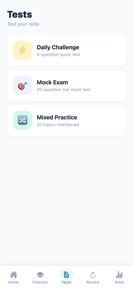
Command Line Basics is an independent study app for shell and terminal skills, featuring 160 practice questions and spaced-repetition for iOS users.
The App DNA
What makes this app unique?
The app removes the barrier of connectivity for students and junior developers who need to practice command line syntax in transit or offline environments.
For Beginners, students, and junior developers seeking practical command line fluency.
What does it look like?
Key features
Schedules review intervals based on memory retention patterns to optimize study efficiency.
Visual dashboard identifies specific command line topics requiring additional practice.
Full access to 160 questions without internet connectivity.
How much does it cost?
Command Line Basics operates as a completely free tool with no gated content or subscription tiers.
Velocity
Maintenance developmentopaqueShow more...
The app has shipped only one release in the last 98 days, indicating a maintenance-focused development cycle. There is no evidence of active feature development or live operations. The current cadence of one release every three months suggests a stable but stagnant product state. Development activity remains minimal with no recent major updates to report.
Who built it?
Tsuyoshi Sezaki
8 apps tracked · Education
 Numerical Methods Concepts
 Computer Networking Basics
 Database Query Logic
 Data Structures Basics
 Critical Thinking for Coding
 G検定 合格ドリル 2026
 English Synonyms Practice
User Sentiment
What do users think recently?
How are ratings & reviews evolving?
Not enough recent reviews to extract reliable themes yet.
Read the full review analysisCompetition
Competitive landscape for Command Line Basics
How's the Education market?
Command Line Basics operates as a niche education tool with no current chart presence, reflecting its status as an independent study resource.
Read the market outlookThe rivals identified
Unlock the deeper market read.
Access the full report for freeThe Analyst's Read
Key takeaways for Command Line Basics
Where is it heading?
The technical education market is consolidating around platforms that offer integrated, browser-based coding environments. Command Line Basics remains a stable, offline-first alternative for mobile users, but its lack of active development limits its ability to compete with platforms that offer real-time feedback.
- The 14-week update cadence confirms a maintenance-only posture, meaning no new content or features are expected in the near term.
The SWOT
- FSRS spaced-repetition algorithm optimizes study intervals
- Weak-point heatmap identifies specific topics for habituation
- Adding cloud-sync would improve multi-device study workflows
Next best moves
Ship cloud-sync because users switch between mobile and desktop environments → increase retention
The counter-intuitive read
The app's lack of monetization is its strongest retention lever…
Read the full takeSince the last report: The app's development strategy has tightened, moving from a general maintenance posture to a prioritized focus on cloud-sync as a critical retention lever. This shift reflects a clearer competitive response to browser-based coding platforms.
Bottom line
Command Line Basics provides a focused, high-utility tool for shell practice. Implementing cloud-sync would unlock multi-device usage, which is the primary friction point for students who study across different environments.
Unlock 2 critical frictions, 1 market threat and the analyst’s take.
Access the full report for freeFAQ
Is Command Line Basics suitable for absolute beginners?
Does Command Line Basics require an internet connection?
Are there any hidden costs or subscriptions?
Sources
- [1] App Store, source
Report last updated