


Compresser: Compress & Convert


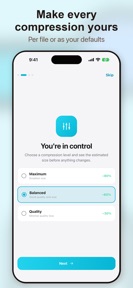


Compresser is an iOS utility for local file compression and format conversion, targeted at users managing device storage.
The App DNA
What makes this app unique?
The app removes the privacy cost of cloud-based file processing by keeping all operations on the local device, serving users who prioritize data security over cloud synchronization.
For iPhone and iPad users seeking to manage device storage and share files without cloud dependency.
What does it look like?
Key features
All file compression and conversion tasks execute locally without cloud uploads or server-side processing.
Compresses multiple photos, videos, or audio files simultaneously.
Changes file formats for images and videos, including JPEG, PNG, HEIC, WebP, MP4, MOV, and AVI.
How much does it cost?
The freemium model relies on a single one-time purchase to remove ads, avoiding recurring subscription pressure.
Velocity
Active developmentUX improvementsperformanceShow more...
Compresser: Compress & Convert is currently in an active development phase, shipping two updates within the last 19 days. The latest release focuses on UX improvements and workflow integration, specifically adding the ability to share files directly from other applications. Development appears stable, with a clear focus on refining user support and core utility features. The cadence suggests a consistent effort to iterate on the app's primary functionality.
Who built it?
Maciej Sieminski
4 apps tracked · Utilities
 DeMotion: Strip Photo Motion
 Tokenly: AI Cost Tracker
 Echo: Emotion Journal
User Sentiment
What do users think recently?
How are ratings & reviews evolving?
Not enough recent reviews to extract reliable themes yet.
Read the full review analysisCompetition
Competitive landscape for Compresser: Compress & Convert
How's the Utilities market?
Compresser occupies the privacy-focused segment of the iOS Utilities market, relying on an on-device processing model to differentiate from cloud-dependent competitors.
Read the market outlookThe rivals identified
Unlock the deeper market read.
Access the full report for freeThe Analyst's Read
Key takeaways for Compresser: Compress & Convert
Where is it heading?
The iOS utility market is consolidating around privacy-first tools, and Compresser's local-only architecture positions it well for users wary of cloud uploads. Sustaining the current release cadence will be critical to building the feature set required to compete with established, multi-platform utilities.
- The active release cadence (two updates in 19 days) indicates the developer is prioritizing feature parity and support accessibility.
- The absence of user reviews suggests the app is in an early discovery phase, requiring a focus on organic install velocity.
The SWOT
- On-device processing removes privacy friction
- No-subscription pricing model reduces barrier to entry
- Localized pricing could capture high-ARPU markets
Next best moves
A/B test premium feature prompts because the current conversion rate is unproven due to low visibility → increase one-time purchase revenue
The counter-intuitive read
The lack of cloud integration is a feature, not a limitation…
Read the full takeBottom line
Focusing on the privacy-first, on-device mechanism will sustain Compresser's niche against cloud-heavy rivals, provided the team prioritizes feature parity with established utility tools to drive initial adoption.
Unlock 1 critical friction, 1 market threat and the analyst’s take.
Access the full report for freeFAQ
Does Compresser require an internet connection to work?
Is Compresser free to use?
What file types can I compress with Compresser?
Sources
- [1] App Store
Report last updated