


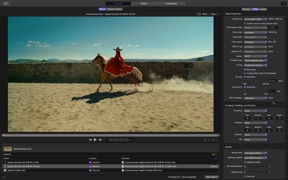
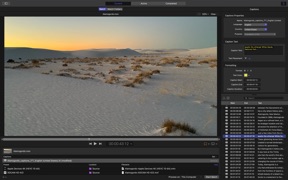
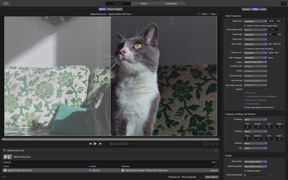
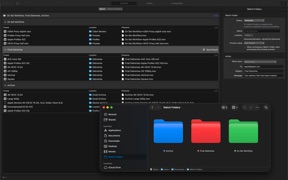
Compressor is a professional video encoding utility for Final Cut Pro and Motion users on macOS.
The App DNA
What makes this app unique?
It removes the time cost of manual encoding by enabling distributed processing and batch workflows for complex, high-resolution media.
For Professional video editors and content creators who use Final Cut Pro and require high-performance, distributed encoding workflows.
What does it look like?
Key features
Distributes encoding tasks across multiple Mac workstations to scale production capacity.
Synchronizes encoding settings and batch processes directly with the primary editing suite.
Packages movies and trailers into compliant formats for Apple-certified delivery partners.
How much does it cost?
The one-time purchase model positions Compressor as a professional utility rather than a subscription-based service.
Velocity
Maintenance developmentperformanceplatform expansionShow more...
The app is currently in a maintenance phase, shipping only a single update in the last 43 days. This release cadence of approximately 0.16 releases per week falls squarely into the maintenance tier. The latest update focused exclusively on stability and bug fixes, with no evidence of new feature development or live operations. Development appears to be focused on long-term stability rather than active feature expansion.
Who built it?
Jatisari Inovasi Studio
13+ apps tracked · Photo & Video
 Apple Sports
 Apple Invites
 Apple Music Classical
 Pixelmator Classic iOS
 Final Cut Camera
 Rep Dominicana Calendario 2026
 Bahrain Calendar 2026
 South African Calendar
 Pakistan Quiz Mania
 Kuis Indonesia Hebat
 Pinoy Quiz Mania
 Ukraine Calendar 2025
User Sentiment
What do users think recently?
The recent review mood reads frustrated. Users appreciate professional video conversion tools provide deep control over complex formats and high-quality output requirements and background processing allows editors to continue working in other applications without interrupting the export workflow, but report recent updates introduced critical stability issues including application crashes and failure to initiate video encoding tasks.
How are ratings & reviews evolving?
What users say, by theme
- Professional video conversion tools provide deep control over complex formats and high-quality output requirements
- Background processing allows editors to continue working in other applications without interrupting the export workflow
- Recent updates introduced critical stability issues including application crashes and failure to initiate video encoding tasks
65 of 445 recent reviews analyzed · high confidence · Frustrated overall
Read the full review analysisUnlock 2 more frustration themes and 1 user request, each backed by review evidence.
Access the full report for freeCompetition
Competitive landscape for Compressor
How's the Photo & Video market?
Compressor occupies the professional video utility niche on macOS, priced at $49.99 as a one-time purchase. The lack of a subscription model differentiates it from modern SaaS competitors, though recent stability issues have weakened its professional standing.
The rivals identified

By Geshi Inc.
This app directly challenges Compressor's core utility by offering high-volume, accessible video conversion and compression tools to a broad mobile audience.
- Offers a high-volume batch processing engine that is more accessible to casual mobile users than Compressor.
- Maintains a massive user base with over 80,000 ratings, creating a significant social proof advantage over Compressor.
- Provides a lightweight, mobile-first conversion experience that avoids the complex professional workflow requirements of Apple's ecosystem.
Unlock the head-to-head verdict: where this rival wins, and where it loses.
Access the full report for freeThe Analyst's Read
Key takeaways for Compressor
Where is it heading?
The professional encoding market is consolidating around stability and format compatibility, and Compressor's recent regressions have left it exposed. Unless the team prioritizes a stability-focused patch to restore legacy support, the current sentiment decline will likely accelerate churn to more reliable, albeit less powerful, competitors.
- Stability regressions in the latest release cause immediate crashes, which erodes the professional trust required for a $49.99 paid utility.
- Removal of legacy encoding formats disrupts established production workflows, forcing professional users to seek alternative encoding solutions.
The SWOT
- Deep integration with Final Cut Pro and Motion enables professional-grade workflows
- Distributed encoding across multiple Mac workstations scales production capacity
- Simplified 'lite' interface could capture the casual conversion market
Next best moves
Audit stability regressions in the latest release because user reports cite immediate crashes on batch initiation → restore professional reliability
+ 1 more prioritized moveThe counter-intuitive read
The professional lock-in of Final Cut Pro is a double-edged sword…
Read the full takeFeature gaps
Mobile-native quick conversion interface (available in Format Factory but absent here)
Since the last report: The app's professional reliability has declined following the removal of legacy encoding formats and the introduction of critical stability regressions. These issues have transformed the product's core value proposition into a churn risk, creating an opening for mobile-first competitors.
Bottom line
Restoring stability and legacy format support is the priority, as the current technical instability erodes the professional reliability that justifies the $49.99 one-time purchase. Addressing these regressions will prevent further churn of the core professional user base to more stable alternatives.
Unlock 2 critical frictions, 1 market threat, 1 more prioritized move and the analyst’s take.
Access the full report for freeFAQ
Is Compressor worth paying for if I only need simple video conversions?
How does Compressor compare to Format Factory?
Does Compressor still support legacy encoding formats?
What is a free alternative for quick video conversions?
Sources
Report last updated