




Connect My Computer is a VNC-based remote desktop client for iOS that allows users to control Mac and Windows computers from mobile devices.
The App DNA
What makes this app unique?
The app serves users who need to monitor or manage remote server hardware and desktop environments when away from their primary workstation.
For Users needing remote access to Mac or Windows desktop environments from mobile devices for productivity tasks.
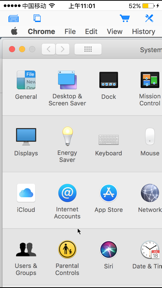
What does it look like?
Key features
Remote access to Mac and Windows computers via VNC protocol.
On-screen keys for Shift, Ctrl, Alt, and Cmd combinations.
Virtual mouse cursor, scroll wheel, and right-click support.
How much does it cost?
The freemium model gates advanced input controls and multi-session management behind a Pro version to monetize power users.
Velocity
Dormant developmentopaqueShow more...
Connect My Computer has been inactive for 524 days, indicating a complete cessation of development. The single release captured in the recent window provided only minor bug fixes, offering no evidence of new features or ongoing support. Given the lack of updates for over a year, the app is classified as a zombie project.
Who built it?
Hana Mobile
10 apps tracked · Productivity
 Alarm Night Clock / Music
 Connect Desktop
 iRemoteDesktop
 Connect to PC
 Harbor Mania HD
 Battery Life Free!
 iRemoteDesktop Lite
 Connect My PC
 iSpending - Expense Tracker
User Sentiment
What do users think recently?
The recent review mood reads upset. Users appreciate remote monitoring of server hardware provides high utility for users managing mac infrastructure from mobile devices.
How are ratings & reviews evolving?
What users say, by theme
- Remote monitoring of server hardware provides high utility for users managing Mac infrastructure from mobile devices
- Frequent application crashes during connection attempts and session management render the remote access functionality unusable for many
49 of 49 recent reviews analyzed · high confidence · Upset overall
Read the full review analysisUnlock 2 more frustration themes and 1 user request, each backed by review evidence.
Access the full report for freeCompetition
Competitive landscape for Connect My Computer
How's the Productivity market?
Connect My Computer occupies a legacy niche in the productivity category, currently holding a 3.47 rating across 98 total reviews. The lack of updates for over 500 days signals a maintenance-only posture that fails to compete with modern, actively supported remote desktop solutions.
Read the market outlookThe rivals identified
Unlock the deeper market read.
Access the full report for freeThe Analyst's Read
Key takeaways for Connect My Computer
Where is it heading?
The remote desktop market is consolidating around apps with high-frequency update cadences and native performance, leaving Connect My Computer exposed. Without a return to active development, the app will continue to lose its remaining user base to more stable, modern alternatives.
- The 17-month development silence suggests the app is in maintenance mode, which prevents it from addressing modern connection stability requirements.
- Persistent user complaints regarding crashes and aggressive ads indicate a declining user experience that will likely accelerate churn in the coming quarter.
The SWOT
- Remote server monitoring capability provides high utility for managing Mac infrastructure
- Standardizing the restore-purchase flow would address primary user friction
Next best moves
Fix connection stability bugs because crashes are the top-cited frustration theme → improve session retention
+ 1 more prioritized moveThe counter-intuitive read
The app's primary value is not as a general-purpose remote desktop…
Read the full takeSince the last report: Development remains stalled for 524 days, with no functional changes to the product. The only material shifts involve the formalization of existing user complaints into the FAQ and a more direct competitive framing within the SWOT analysis.
Bottom line
The lack of development cadence over the last 17 months renders Connect My Computer a legacy tool, and addressing stability is the only path to retaining the remaining user base.
Unlock 3 critical frictions, 1 market threat, 1 more prioritized move and the analyst’s take.
Access the full report for freeFAQ
Is Connect My Computer suitable for beginners?
Does the app work for free?
Are there issues with ads in the app?
What are the alternatives to Connect My Computer?
Sources
- [1] App Store, source
Report last updated