


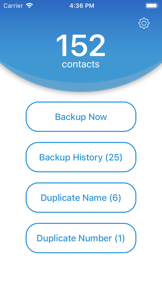
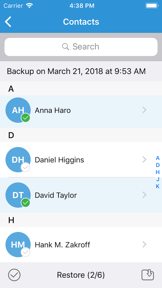
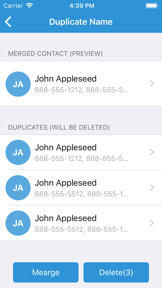
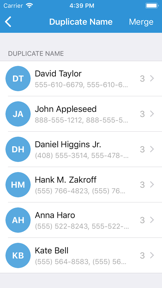

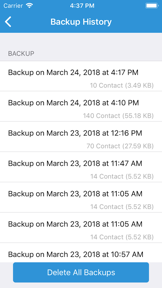
Contact Manager & Backup is a productivity utility for iOS that enables manual VCF-based contact export and duplicate merging.
The App DNA
What makes this app unique?
Users hire this app for offline, manual control over contact data, avoiding the perceived privacy risks of cloud-synced address books.
For Mobile users seeking basic address book maintenance and manual data backup tools.
What does it look like?
Key features
Initiates a full export of device contacts into a VCF file with a single interaction.
Identifies and merges redundant contact entries to clean the address book.
Sends generated VCF backup files as email attachments directly from the interface.
How much does it cost?
The app operates as a free utility with no visible subscription or IAP gates.
Velocity
Dormant developmentopaqueShow more...
The app has been inactive for over 98 months, far exceeding the threshold for a zombie classification. There is no evidence of ongoing development, feature updates, or maintenance. The single available release note is generic and provides no insight into functional evolution. The project appears to be abandoned.
Who built it?
Hareshbhai Issamaliya
12 apps tracked · Productivity
 Video to MP3 - MP3 Converter
 SIP Calculator & Planner
 EMI Calculator: Loan Planner
 Interest Calculator & Planner
 Photo Collage - Story Maker
 Mirror Photo Editor - Collage
 All Seasons Photo Frame
 DSLR Camera Effect
 Discount Calculator - SalesTax
 Document Scanner App- PDF Scan
 Ringtone Maker : MyRingtone
User Sentiment
What do users think recently?
How are ratings & reviews evolving?
Not enough recent reviews to extract reliable themes yet.
Read the full review analysisCompetition
Competitive landscape for Contact Manager & Backup
How's the Productivity market?
The app maintains a 3.6-star rating across 30 reviews, positioning it as a niche utility in the Productivity category. The lack of recent updates since 2018 signals a maintenance-only posture that limits its ability to compete with modern, cloud-integrated alternatives.
Read the market outlookThe rivals identified

By Intralinks, Inc.
Intralinks competes by offering enterprise-grade document management and secure data room environments that overlap with the backup and organization needs of professional users.
- Provides enterprise-grade Information Rights Management that secures sensitive documents far beyond simple contact backup utilities.
- Offers a sophisticated Virtual Data Room environment designed for complex corporate transactions and secure collaboration.
- Maintains a massive institutional user base that creates high switching costs for professional document workflows.


Unlock the head-to-head verdict: where this rival wins, and where it loses.
Access the full report for freeThe Analyst's Read
Key takeaways for Contact Manager & Backup
Where is it heading?
The productivity utility market is shifting toward automated, cloud-native synchronization, leaving manual backup tools like this one increasingly isolated. Without a move to modernize the export workflow, the app will continue to lose relevance to competitors that offer background-syncing capabilities.
- The lack of updates since 2018 suggests the app is in maintenance mode, which will lead to compatibility issues with future iOS versions.
The SWOT
- One-tap VCF export mechanism provides immediate, low-friction utility for manual data portability.
- Integration of automated cloud-storage triggers could remove the manual export step.
Next best moves
Audit manual export workflow because 3.6-star rating indicates high friction → improve user retention.
The counter-intuitive read
The app's lack of cloud integration is not…
Read the full takeFeature gaps
Automated cloud-storage integration (available in Infomaniak kDrive but absent here) +1
Since the last report: The report updates the competitive landscape to reflect a broader document-utility market and reclassifies the app's primary risk from data-loss bugs to general obsolescence due to a lack of cloud integration.
Bottom line
The app provides a functional, manual backup utility, but its 2018-era workflow is increasingly obsolete, so the PM should prioritize cloud-sync integration to prevent total user churn to modern alternatives.
Unlock 2 critical frictions, 1 market threat and the analyst’s take.
Access the full report for freeReport last updated