


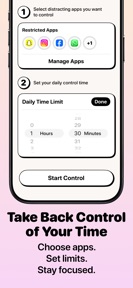
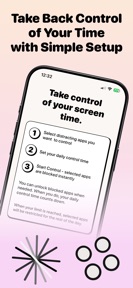
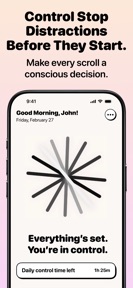

Control – Screen Time Limits is an iOS productivity utility that enforces user-defined app blocking and usage schedules using Apple Screen Time frameworks.
The App DNA
What makes this app unique?
The tool removes the cognitive friction of manual self-regulation by automating the enforcement of daily screen time boundaries.
For Individuals seeking to reduce screen time and improve focus through automated app usage constraints.
What does it look like?
Key features
Restricts access to selected applications once a user-defined daily limit is reached using Apple Screen Time frameworks.
Allows users to set specific time-based boundaries for app usage throughout the day.
Operates as a background process to enforce usage limits without requiring the app to remain in the foreground.
How much does it cost?
Control – Screen Time Limits is currently listed as free with no explicit mention of subscription tiers or in-app purchases.
Velocity
Dormant developmentopaqueShow more...
Control – Screen Time Limits has been inactive for 173 days, falling well outside the threshold for active development. With only a single version released since its debut, there is no evidence of ongoing maintenance or feature iteration. The development status is currently stagnant.
Who built it?
Bhautik Amipara
2 apps tracked · Productivity
 Insta Save: Reels Story Video
User Sentiment
What do users think recently?
How are ratings & reviews evolving?
Not enough recent reviews to extract reliable themes yet.
Read the full review analysisCompetition
Competitive landscape for Control – Screen Time Limits
How's the Productivity market?
Control – Screen Time Limits maintains a free-only pricing model with no in-app purchases, positioning it as a low-barrier utility in the productivity category. The absence of updates for 174 days indicates a lack of active market competition against updated rivals.
Read the market outlookThe rivals identified
Unlock the deeper market read.
Access the full report for freeThe Analyst's Read
Key takeaways for Control – Screen Time Limits
Where is it heading?
The productivity utility market is consolidating around apps with active live-ops and subscription-funded development cycles. Control – Screen Time Limits remains exposed due to its 174-day update gap, which will likely lead to churn as users migrate to tools that offer consistent compatibility and feature updates.
- The 174-day update gap indicates a dormant maintenance state, which increases the risk of the app breaking with future iOS updates.
- The absence of a monetization model prevents the developer from funding the ongoing maintenance required to keep the app competitive.
The SWOT
- Native Apple Screen Time integration ensures system-level enforcement of usage limits
- Introducing a tiered subscription for advanced analytics could provide a sustainable revenue stream
Next best moves
Pivot the product strategy to a freemium model because the current free-only approach lacks a revenue mechanism → unlock resources for feature expansion
+ 2 more prioritized movesThe counter-intuitive read
The app's lack of monetization is not a feature for users…
Read the full takeSince the last report: The app's functional and pricing profile remains unchanged, while the analytical assessment has shifted toward a more critical view of its long-term viability due to continued inactivity.
Bottom line
Control – Screen Time Limits serves as a functional, free utility, but the 174-day update gap suggests the developer has deprioritized the project. If the developer intends to compete, they must establish a feature-release cadence to prevent the tool from becoming obsolete.
Unlock 2 critical frictions, 1 market threat, 2 more prioritized moves and the analyst’s take.
Access the full report for freeFAQ
Is Control – Screen Time Limits free to use?
Does Control – Screen Time Limits work in the background?
How does Control – Screen Time Limits block apps?
Sources
- [1] App Store, source
Report last updated