


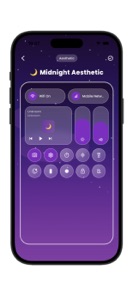


Control Widget is a customization utility for iOS that provides 340+ themes for phone control panels.
The App DNA
What makes this app unique?
Users hire this app to achieve visual consistency across their device interface, solving the problem of rigid, non-aesthetic system defaults.
For Smartphone users seeking aesthetic customization and visual consistency across their device interface.
What does it look like?
Key features
340+ visual styles act as a retention loop for repeat usage.
Quick access toggles for brightness, volume, and wireless settings.
Real-time visual feedback of panel customization before application.
How much does it cost?
The app is currently listed as free with no explicit subscription or IAP tiers identified in the store metadata.
Velocity
Maintenance developmentperformanceopaqueShow more...
The app currently ships at a maintenance cadence, with only one release recorded in the last 43 days. Development activity is limited to minor bug fixes, as indicated by the generic release notes. There is no evidence of new feature development or live operations. The current release pattern suggests a focus on stability rather than active product evolution.
Who built it?
Mohamed Laabouli
9 apps tracked · Utilities
 MX Tunnel pro
 Puzzle Water Color Sort Games
 Photo Editor - Face Makeup
 Neon Red Heartbeat Theme
 Emoji Battery & Shimeji Pet
 Npv Tunnel V2ray/SSH
 MTM Tunnel Lite
 MAPS.ME: Offline maps GPS Nav
User Sentiment
What do users think recently?
How are ratings & reviews evolving?
Not enough recent reviews to extract reliable themes yet.
Read the full review analysisCompetition
Competitive landscape for Control Widget: Theme & Panels
How's the Utilities market?
Control Widget operates in the Utilities category with a focus on visual personalization. The lack of IAP or subscription tiers suggests a low-monetization strategy that prioritizes user acquisition over immediate revenue.
Read the market outlookThe rivals identified
Unlock the deeper market read.
Access the full report for freeThe Analyst's Read
Key takeaways for Control Widget: Theme & Panels
Where is it heading?
The aesthetic utility market is consolidating, and the app's maintenance-mode update cadence leaves it exposed to OS-level feature creep. The PM must shift from content-only updates to functional automation to prevent user churn to native alternatives.
- Recent updates focused on stability, no feature expansion, which signals a maintenance-mode posture rather than aggressive growth.
The SWOT
- 340+ theme library provides a high-volume visual retention loop.
- Live preview mechanism reduces user friction during the customization process.
- Wearable companion app integration could expand the customization surface area.
- B2B partnerships with icon-pack designers could diversify the theme library.
Next best moves
Ship automated theme switching because manual updates are the top friction point → increase daily active usage.
The counter-intuitive read
The app's lack of monetization is a strategic advantage…
Read the full takeSince the last report: The product strategy shifted from a content-heavy model to a functional automation focus to address user friction and OS-level competition.
Bottom line
Control Widget captures the aesthetic-customization segment through its large theme library, but the manual-switching friction limits its utility, so the PM should prioritize automated triggers to secure long-term retention.
Unlock 2 critical frictions, 1 market threat and the analyst’s take.
Access the full report for freeSources
- [1] App Store, source
Report last updated