


Convert HEIC to JPG Converter
By 汇杭 钟

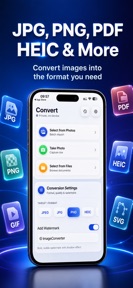
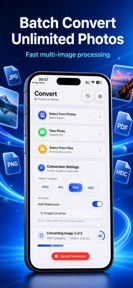


Convert HEIC to JPG Converter is a local-processing image utility for iOS that converts HEIC files to JPG, PNG, and PDF formats.
The App DNA
What makes this app unique?
The app removes the friction of web-upload failures and storage constraints for users who prioritize on-device privacy over cloud-based alternatives.
For iPhone users needing to convert HEIC photos for compatibility with non-Apple devices or web upload forms.
What does it look like?
Key features
Processes image files entirely on-device without server uploads, serving as a privacy-focused brand moat.
Converts up to 1000 files simultaneously, acting as a premium-tier gate for power users.
Adjusts JPEG compression levels to manage file size, providing a paid-conversion lever.
How much does it cost?
The subscription-only model for premium features creates a clear monetization gate for power users.
Velocity
Maintenance developmentperformanceUX improvementsShow more...
The app currently operates at a maintenance cadence, with only one release shipped in the last 114 days. Development is focused on minor stability improvements and performance optimizations rather than new feature rollouts. The latest release emphasizes local processing and UI polish, reflecting a stable but slow development cycle. There is no evidence of live operations or frequent feature iteration.
Who built it?
汇杭 钟
13+ apps tracked · Productivity
 Relax Melodies - Sleep Sounds
 Sonic Hz Frequency Generator
 Vibration Massager Controller
 Hearing Aid · Sound Amplifier
 Find Bluetooth Device Finder
 Blood Glucose Monitor Tracker
 Live Transcribe Voice to Text
 Export Contacts To CSV Excel
 Exif Metadata Remover Viewer
 Decibel Meter Sound Level dB
 Autocue Teleprompter Video Cue
 Talk To Your Cat Translator
User Sentiment
What do users think recently?
How are ratings & reviews evolving?
Not enough recent reviews to extract reliable themes yet.
Read the full review analysisCompetition
Competitive landscape for Convert HEIC to JPG Converter
How's the Productivity market?
Convert HEIC to JPG Converter operates in the Productivity category, maintaining a 5.0-star rating across a limited sample of two reviews. The lack of significant update activity since June 2025 suggests a low-velocity market position focused on niche utility rather than aggressive growth.
Read the market outlookThe rivals identified
Unlock the deeper market read.
Access the full report for freeThe Analyst's Read
Key takeaways for Convert HEIC to JPG Converter
Where is it heading?
The market for image-format utilities is consolidating as native OS features absorb basic conversion tasks. Convert HEIC to JPG Converter remains stable by focusing on offline privacy, but it must address the friction of its subscription model to remain competitive against free, native alternatives.
- The 114-day update gap indicates a stable, maintenance-focused cadence that avoids the technical debt of frequent, unnecessary feature changes.
- Native iOS Shortcuts integration reduces the long-term necessity for dedicated third-party converters, creating a structural ceiling on user acquisition.
The SWOT
- Local-only processing removes the connectivity dependency rivals require
- One-time purchase option could capture users rejecting subscription costs
Next best moves
Pivot monetization to include a one-time purchase option because the subscription-only model faces high friction for a single-use utility → increase conversion velocity.
+ 1 more prioritized moveThe counter-intuitive read
The app's maintenance-mode cadence is a feature, not a bug…
Read the full takeBottom line
Convert HEIC to JPG Converter relies on the privacy-focused offline mechanism to justify its subscription model, but the current maintenance-mode cadence leaves it vulnerable to native iOS feature expansion. A pivot to a one-time purchase option would better align with the utility-focused user job-to-be-done.
Unlock 1 critical friction, 1 market threat, 1 more prioritized move and the analyst’s take.
Access the full report for freeFAQ
Is Convert HEIC to JPG Converter free to use?
Does Convert HEIC to JPG Converter require an internet connection?
What formats can I convert my HEIC photos into?
Sources
- [1] App Store
Report last updated