





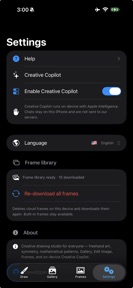



Creative Drawing Pro is a privacy-focused design studio for freehand art, symmetry, and photo editing on iPhone and iPad.
The App DNA
What makes this app unique?
The app removes the privacy friction associated with cloud-based AI art tools by processing all ideation and pattern generation locally on the device.
For Digital artists and hobbyists seeking privacy-focused tools for geometric art, mandala creation, and photo annotation.
What does it look like?
Key features
Generates 62 mathematical patterns including kaleidoscope and fractals on-canvas.
Provides art ideas using on-device Apple Intelligence without cloud data transmission.
Supports vertical mirroring and radial symmetry for real-time pattern creation.
How much does it cost?
The 10-day trial serves as the primary conversion lever for the full studio access.
Velocity
Maintenance developmentopaqueShow more...
The app has remained in a maintenance state since its debut 80 days ago, with only a single version released to date. There is no evidence of ongoing development, feature expansion, or live operations. Given the lack of subsequent updates, the current development momentum is stagnant.
Who built it?
MAJED AL MUBARAK
2 apps tracked · Graphics & Design
 Islamic AI Dream Interpreting
User Sentiment
What do users think recently?
How are ratings & reviews evolving?
Not enough recent reviews to extract reliable themes yet.
Read the full review analysisCompetition
Competitive landscape for Creative Drawing Pro
How's the Graphics & Design market?
Creative Drawing Pro operates in the Graphics & Design category with a privacy-first focus. The lack of public ratings 80 days post-launch indicates a significant gap in user acquisition and community engagement.
Read the market outlookThe rivals identified
Unlock the deeper market read.
Access the full report for freeThe Analyst's Read
Key takeaways for Creative Drawing Pro
Where is it heading?
The design app market is consolidating around tools that offer strong community-sharing features. Creative Drawing Pro remains exposed due to its lack of social integration and stagnant release cadence, which will likely prevent it from gaining traction against established competitors.
- The 80-day update gap following launch suggests the developer has not yet established a sustainable feature-release cadence → growth remains stalled.
The SWOT
- On-device Apple Intelligence processing ensures data privacy
- Implement social sharing templates to drive organic discovery
Next best moves
Ship social sharing templates because the current lack of user-generated content limits organic discovery → increase install velocity
The counter-intuitive read
The privacy-first on-device AI focus is a liability…
Read the full takeBottom line
Creative Drawing Pro must pivot from a static studio to a social-sharing platform to overcome the current lack of user traction. Implementing community-driven export templates would address the discovery deficit driving the current stagnation.
Unlock 1 critical friction, 1 market threat and the analyst’s take.
Access the full report for freeFAQ
Is Creative Drawing Pro free to use?
Does Creative Drawing Pro require an internet connection?
What are the main alternatives to Creative Drawing Pro?
Sources
- [1] App Store, source
Report last updated