





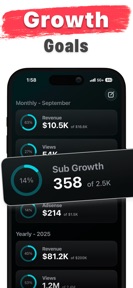


Creator View for YouTube is a business-management tool for content creators on iOS that tracks revenue, expenses, and content schedules.
The App DNA
What makes this app unique?
Creators use the app to bridge the gap between platform-native analytics and the financial realities of running a content business.
For YouTube creators ranging from beginners to those scaling their channel into a full-time business.
What does it look like?
Key features
Logs revenue and expenses to visualize profit margins, positioning the app as a business-focused tool.
Drag and drop interface for scheduling videos and podcasts, with a premium-tier gate for unlimited planning.
Displays channel goals and statistics, driving daily app usage habits.
How much does it cost?
The subscription model gates unlimited data entry and advanced tracking features behind a Pro tier to monetize professional creator workflows.
Velocity
Maintenance developmentmonetizationperformanceShow more...
The app has been in a state of maintenance for over 200 days, with the latest release occurring 209 days ago. Development activity is limited to minor bug fixes and performance improvements, with no evidence of new features or live operations. The current cadence of one release every seven months indicates a significant deceleration in development momentum. The publisher is not actively iterating on the product through the App Store at this time.
Who built it?
Creator View, L.L.C.
3 apps tracked · Business
 3D Model Maker - ImgTo3D
 Push Push: Formula Widgets
User Sentiment
What do users think recently?
Recent user voice shows a thrilled sentiment. Users appreciate creators value the ability to track expenses alongside income to visualize true profit margins and live widgets showing subscriber and view counts provide immediate feedback for creators on their homescreen.
How are ratings & reviews evolving?
What users say, by theme
- Creators value the ability to track expenses alongside income to visualize true profit margins
- Live widgets showing subscriber and view counts provide immediate feedback for creators on their homescreen
- The developer maintains a responsive and helpful communication channel for feature suggestions and support inquiries
- Application crashes immediately upon launch following the sign up process with Google authentication
11 of 11 recent reviews analyzed · moderate confidence · Thrilled overall
Read the full review analysisUnlock 1 user request, each backed by review evidence.
Access the full report for freeCompetition
Competitive landscape for Creator View for YouTube
How's the Business market?
Creator View for YouTube maintains a 4.75 rating across 232 reviews, positioning it as a high-satisfaction utility for independent creators. Its focus on financial tracking differentiates it from the broader YouTube Studio toolset, though its maintenance-mode release cadence limits its ability to compete with AI-driven rivals.
Read the market outlookThe rivals identified

By Edouard Barbier
Both apps target YouTube creators by providing channel analytics and monetization tracking, competing for the same user base of content creators managing their business metrics.
- Creatipi includes an AI-powered video title generator, whereas Creator View focuses on manual business management tools.
- Creator View offers a content calendar for planning podcasts and shorts, which is absent in Creatipi.
- Creatipi provides specific progress tracking toward YouTube's 1,000-subscriber and 4,000-hour watch time requirements.
 YouTube StudioContender
 YT Keyboard Boost for YouTubeContender
 Bramble: Content PlannerContender
 GridMind – Content PlannerContender
 SubsAI Tracker for YouTubeContender
 UGC Planner: Run Your BusinessContender
 Creator Calculator – EarningsContender
 Plotr - Content PlannerContender
Show 1 more

Unlock the head-to-head verdict: where this rival wins, and where it loses.
Access the full report for freeThe Analyst's Read
Key takeaways for Creator View for YouTube
Where is it heading?
The creator-management market is consolidating around AI-assisted workflows, placing manual tools like Creator View for YouTube at a disadvantage. If the developer does not address the onboarding crashes, the app will lose its ability to capture new users, regardless of its financial-tracking utility.
- The six-month gap since the last major update signals a maintenance-only posture, which leaves the app vulnerable to faster-moving AI-integrated rivals.
- The 4.75 rating indicates strong product-market fit for the existing financial tracking features, providing a stable base for future monetization experiments.
The SWOT
- Integrated revenue and expense tracking provides a business-focused view for creators
- Widget customization for multi-channel creators remains an untapped retention lever
Next best moves
Audit Google authentication flow because users report immediate crashes post-setup → reduce new-user churn
The counter-intuitive read
The app's maintenance-mode status is a competitive advantage…
Read the full takeFeature gaps
AI-powered video title generation (available in Creatipi but absent here) +1
Since the last report: The app remains in a maintenance-only state with no product or pricing changes, though the competitive outlook has shifted to mixed due to the rapid rise of AI-integrated rivals.
Bottom line
Fixing the authentication crash is the only path to growth, as the current onboarding failure prevents new users from accessing the app's core financial tracking value.
Unlock 1 critical friction, 1 market threat and the analyst’s take.
Access the full report for freeFAQ
Is Creator View for YouTube better than YouTube Studio?
Does Creator View for YouTube work for small channels?
Is Creator View for YouTube safe to use?
What is a free alternative to Creator View for YouTube?
Sources
- [1] App Store, source
Report last updated