


CrewConnect: Layovers & Crew
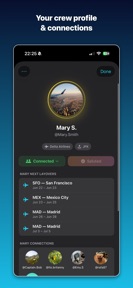


CrewConnect is a verified social network for flight attendants and pilots, designed to facilitate layover meetups and local recommendations on iOS.
The App DNA
What makes this app unique?
It replaces the isolation of solo hotel stays with a trusted community, removing the social friction of meeting strangers in unfamiliar cities.
For Flight attendants and pilots seeking social connections, local recommendations, and community support during layovers.
What does it look like?
Key features
Restricts network access to verified flight attendants and pilots, ensuring a high-trust environment.
Matches users landing in the same city at the same time for social meetups.
Crowdsourced map of restaurants, cafes, and gyms recommended by crew members.
How much does it cost?
The platform operates as a free, ad-free, and tracker-free utility, prioritizing user trust over immediate monetization.
Velocity
Active developmentsocial featuresnew contentShow more...
CrewConnect: Layovers & Crew maintains an active development cadence, with 2 releases over the last 28 days. The latest version significantly expands the app's social utility by adding layover meet-up planning and location-based event discovery. This follows a period of stability, indicating a focus on building out community-driven features. The development trend is stable, with consistent feature-rich updates.
Who built it?
User Sentiment
What do users think recently?
How are ratings & reviews evolving?
Not enough recent reviews to extract reliable themes yet.
Read the full review analysisCompetition
Competitive landscape for CrewConnect: Layovers & Crew
How's the Travel market?
CrewConnect occupies a unique niche in the Travel category, focusing on professional identity verification rather than mass-market discovery. With a 4.5 rating on the App Store, it maintains high user satisfaction despite a limited review volume.
Read the market outlookThe rivals identified
Unlock the deeper market read.
Access the full report for freeThe Analyst's Read
Key takeaways for CrewConnect: Layovers & Crew
Where is it heading?
The travel-social market is consolidating around utility-driven tools that solve specific pain points for mobile professionals. CrewConnect is well-positioned to capture the aviation segment, provided it can reduce the manual friction of its core matching loop.
- The latest release introduces location-based hangouts, shifting the app from a static directory to a dynamic social tool.
- The active release cadence suggests a commitment to feature expansion, which is necessary to retain users in a competitive travel-social space.
The SWOT
- Verified crew-only access creates a high-trust barrier to entry.
- Crowdsourced city maps provide utility that general travel guides lack.
- Ad-free model aligns with the professional needs of the aviation community.
- Automating layover matching via flight-schedule API integration.
- Expanding into crew-specific marketplace services for layover logistics.
- Partnerships with airline-specific crew unions to scale user acquisition.
Next best moves
Integrate flight-schedule APIs because manual entry is a high-friction barrier → increase match density.
+ 1 more prioritized moveThe counter-intuitive read
The app's small user base is actually a feature, not a bug…
Read the full takeSince the last report: The platform transitioned from a feature-expansion phase to a friction-reduction phase, prioritizing the automation of layover matching to improve user retention.
Bottom line
CrewConnect's verified community is a defensible asset, but the manual entry friction limits its utility as a daily tool. Automating the layover matching process would unlock the network effects necessary to scale beyond a niche directory.
Unlock 3 critical frictions, 3 market threats, 1 more prioritized move and the analyst’s take.
Access the full report for freeFAQ
Is CrewConnect free to use?
How does CrewConnect verify users?
Can I use CrewConnect if I am not a pilot or flight attendant?
What happens if I don't see other crew in my layover city?
Sources
- [1] App Store
Report last updated