


Date Alarm Clock

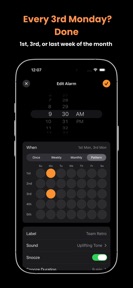


Date Alarm Clock is a utility app for iOS that enables date-specific and location-based alarm scheduling.
The App DNA
What makes this app unique?
It removes the cognitive friction of managing non-daily recurring events like rent or travel stops, which standard alarm clocks cannot handle.
For Commuters, travelers, and individuals needing precise, date-specific, or location-aware reminders.
What does it look like?
Key features
Schedules alarms for exact calendar dates and recurring patterns like the last day of the month.
Triggers alerts based on GPS proximity, allowing background operation for commuters.
Displays real-time trip distance and ETA on the Lock Screen and Dynamic Island.
How much does it cost?
The app is currently offered as a free utility with no visible subscription or IAP gates.
Velocity
Maintenance developmentnew contentUX improvementsplatform expansionShow more...
The app currently operates at a maintenance cadence, with two releases shipped in the last 13 days. Development is focused on expanding core functionality, specifically through the introduction of recurring alarm patterns and platform-specific UI improvements for iPad. The release history shows a stable, albeit infrequent, update pattern. Future development appears focused on refining existing utility features rather than rapid iteration.
Who built it?
User Sentiment
What do users think recently?
Fresh user feedback skews thrilled. Users appreciate date-specific alarm functionality allows users to track deadlines and anniversaries beyond simple daily time triggers and clean interface design combined with countdown features provides a clear and useful user experience.
How are ratings & reviews evolving?
What users say, by theme
- Date-specific alarm functionality allows users to track deadlines and anniversaries beyond simple daily time triggers
- Clean interface design combined with countdown features provides a clear and useful user experience
- Privacy-focused data handling reassures users that their personal information remains secure during app usage
1 of 1 recent reviews analyzed · limited sample
Read the full review analysisCompetition
Competitive landscape for Date Alarm Clock
How's the Utilities market?
Date Alarm Clock maintains a 5.0 rating across 7 total ratings, positioning it as a high-satisfaction niche tool. Its free-to-use, no-gate model differentiates it from category rivals that typically utilize subscription-based monetization.
Read the market outlookThe rivals identified
Unlock the deeper market read.
Access the full report for freeThe Analyst's Read
Key takeaways for Date Alarm Clock
Where is it heading?
The category is shifting toward high-utility, system-integrated reminders that leverage OS-level APIs like Live Activities. Date Alarm Clock is well-positioned to capture this segment, but it must transition to a sustainable revenue model to survive as a standalone product.
- The latest release (v1.4) added iPad support and complex recurring patterns, signaling active feature investment rather than maintenance mode.
- The app maintains a consistent 45-day update cadence, which provides enough stability to retain the current user base.
The SWOT
- Location-based background triggers enable commuter utility without active app engagement
- Date-specific scheduling logic solves calendar-based pain points standard alarms ignore
- Introducing a premium tier for advanced features could capture revenue from power users
- Expanding location-based triggers to include smart-home integration could increase utility
Next best moves
Implement a freemium model because the current free-only strategy lacks revenue sustainability → increase development runway
The counter-intuitive read
The lack of monetization is not a feature but a vulnerability…
Read the full takeBottom line
Date Alarm Clock successfully solves specific scheduling pain points, but the lack of monetization creates a sustainability risk. Transitioning to a freemium model would unlock the revenue needed to defend its niche against system-level feature updates.
Unlock 2 critical frictions, 2 market threats and the analyst’s take.
Access the full report for freeFAQ
Is Date Alarm Clock free to use?
Does Date Alarm Clock work in the background?
How does Date Alarm Clock compare to the standard iPhone alarm?
Sources
- [1] App Store
Report last updated