


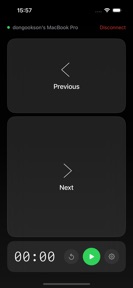



Deck - Presentation Remote is a wireless control utility for Mac presentation software, allowing iPhone and Apple Watch navigation.
The App DNA
What makes this app unique?
Presenters need reliable, low-latency control of slides that functions without cloud accounts or internet dependency.
For Professionals and presenters who use Mac-based presentation software and seek hardware-integrated control via iPhone and Apple Watch.
What does it look like?
Key features
Direct connection between iPhone and Mac via local network without cloud accounts or internet dependency.
Navigation of slides using double-tap gestures, wrist flicks, and Digital Crown rotation.
Configurable timer with color-coded bars and haptic alerts.
How much does it cost?
Subscription model anchored at $19.99/year, gating advanced remote features behind a Pro tier.
Velocity
Maintenance developmentUX improvementsShow more...
The app maintains a maintenance-level cadence, with only one release shipped in the last 80 days. Development appears focused on branding and minor adjustments, as evidenced by the latest release which primarily served to rebrand the application. There is no evidence of active feature development or live operations. The current release frequency suggests a stable, low-intensity maintenance cycle.
Who built it?
User Sentiment
What do users think recently?
The recent review mood reads upset.
How are ratings & reviews evolving?
What users say, by theme
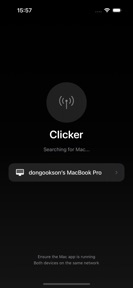
- Network discovery failures prevent the remote control from identifying the host computer on local networks
1 of 1 recent reviews analyzed · limited sample
Read the full review analysisCompetition
Competitive landscape for Deck - Presentation Remote
How's the Productivity market?
Deck - Presentation Remote occupies the niche productivity space for Mac-integrated hardware remotes. The current 1★ rating across 1 review indicates a failure to meet basic functional expectations for the $19.99/year price point.
Read the market outlookThe rivals identified
Unlock the deeper market read.
Access the full report for freeThe Analyst's Read
Key takeaways for Deck - Presentation Remote
Where is it heading?
The market for Mac-integrated remotes is highly sensitive to connection stability, as users prioritize reliability over hardware-specific gestures. Deck - Presentation Remote faces a high churn risk until the discovery protocol is stabilized, as the current state fails to justify the $19.99/year subscription.
- Critical network discovery failures prevent host identification, which renders the tool unusable and drives immediate churn of trial users.
The SWOT
- Peer-to-peer Mac pairing removes cloud-dependency
- Apple Watch gesture controls offer hands-free navigation
Next best moves
Rebuild network discovery protocol because users report the app fails to locate host computers → restore core functionality
The counter-intuitive read
The rebranding to Deck - Presentation Remote masks…
Read the full takeBottom line
Fixing the network discovery failure is the only path to retaining users, as the current inability to connect the remote to the host computer invalidates the $19.99/year subscription value proposition.
Unlock 1 critical friction, 1 market threat and the analyst’s take.
Access the full report for freeFAQ
Is Deck - Presentation Remote compatible with my Mac?
Does Deck - Presentation Remote require an internet connection?
What happens if the app cannot find my Mac?
Sources
Report last updated