





Desktop Browser - View Desktop is a utility app for iOS that forces websites to load desktop versions instead of mobile-optimized layouts.
The App DNA
What makes this app unique?
Users rely on the app to bypass mobile-web limitations when performing site management or productivity tasks that require full desktop functionality.
For Mobile users who require desktop-grade web layouts for productivity or site management tasks.
What does it look like?
Key features
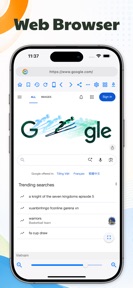
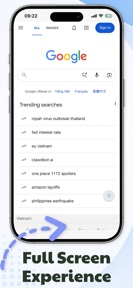
Forces websites to load desktop versions rather than mobile-optimized layouts, solving the pain point of limited mobile web layouts.
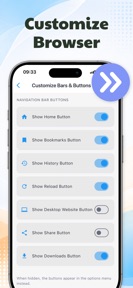
Allows independent UI configuration for portrait and landscape orientations, increasing session duration via ergonomic tailoring.
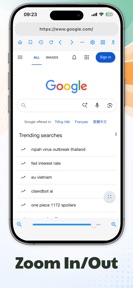
Provides manual zoom scaling from 1x to 3x.
How much does it cost?
The utility is distributed as a free tool without visible IAP or subscription gates.
Velocity
Maintenance developmentperformanceUX improvementsShow more...
The app maintains a maintenance-tier cadence, shipping approximately 0.15 releases per week. Development is currently focused on minor performance and stability improvements rather than new feature sets. The latest release, which arrived 7 days ago, continues the trend of providing generic stability updates without introducing new functionality. The development pace has remained stable at this low-frequency interval over the observed period.
Who built it?
Thien An Studio
5 apps tracked · Utilities
 Jigsolitaire Puzzle Pro
 Color Analysis -
 Cost Saver for AI Chatbot
 API & HTTP Client
User Sentiment
What do users think recently?
How are ratings & reviews evolving?
Not enough recent reviews to extract reliable themes yet.
Read the full review analysisCompetition
Competitive landscape for Desktop Browser - View Desktop
How's the Utilities market?
Desktop Browser - View Desktop occupies a narrow utility niche, maintaining a 4.5-star rating across 22 reviews. The lack of a monetization model and a 76-day average update cadence suggest a low-priority project rather than a growth-focused product.
Read the market outlookThe rivals identified
Unlock the deeper market read.
Access the full report for freeThe Analyst's Read
Key takeaways for Desktop Browser - View Desktop
Where is it heading?
The market for single-purpose desktop-rendering utilities is consolidating as mainstream browsers integrate these capabilities natively. Desktop Browser - View Desktop remains in a maintenance-mode cycle, which prevents it from adapting to these competitive pressures and suggests a declining outlook for user retention.
- The 76-day average update cadence indicates a lack of active development, which leaves the app vulnerable to OS-level changes in mobile web rendering.
- Mainstream browsers now include native desktop-mode toggles, which directly cannibalizes the app's primary function and limits its long-term growth potential.
The SWOT
- Independent UI configuration for portrait and landscape orientations increases session duration via ergonomic tailoring
- Localized UI support could capture users in markets where desktop-web management is the primary mobile productivity workflow
Next best moves
Audit mainstream browser desktop-mode feature parity because native toggles are eroding the core value proposition → reduce churn risk
The counter-intuitive read
The lack of monetization is a strategic liability…
Read the full takeSince the last report: The outlook for the utility has shifted from stable to declining, reflecting the increased risk of obsolescence as mainstream browsers integrate native desktop-rendering capabilities. The lack of a monetization model is now explicitly cited as a barrier to funding the necessary competitive response.
Bottom line
The app's current maintenance-mode status fails to address the threat posed by native desktop-mode toggles in mainstream browsers, signaling that the current utility-only approach will likely see declining relevance without a pivot to advanced site-management features.
Unlock 1 critical friction, 1 market threat and the analyst’s take.
Access the full report for freeFAQ
Is Desktop Browser - View Desktop better than Safari's desktop mode?
Does Desktop Browser - View Desktop cost money to use?
Is this app safe to use for managing sensitive websites?
Sources
- [1] App Store, source
Report last updated