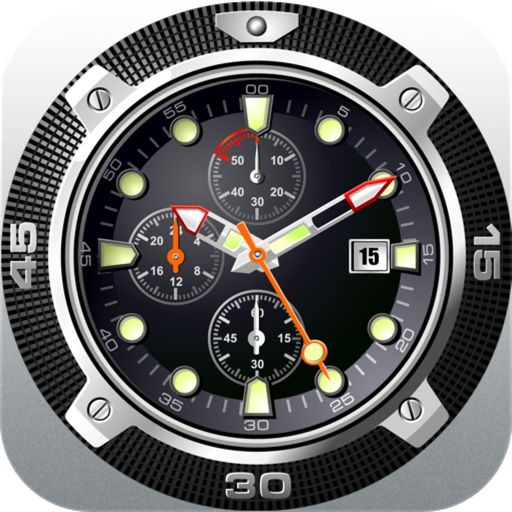

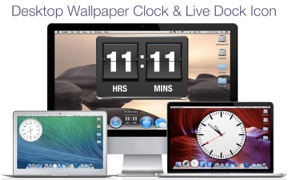
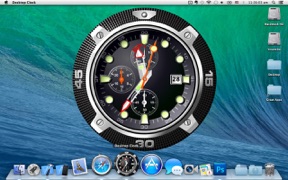


Desktop Clock + is a desktop-focused timekeeping utility for Mac and Android, offering various analog and flip-clock designs.
The App DNA
What makes this app unique?
It serves users who prioritize desktop aesthetic customization over the functional reliability of native system clocks.
For Mac users seeking desktop aesthetic customization and Android users requiring a functional alarm and world clock tool.
What does it look like?
Key features
Provides 23 distinct clock designs including analog and flip-clock options for Mac desktop display.
Configurable trigger zones to bring the clock widget to the foreground via mouse movement.
Syncs alarms and timers to wearable devices via watch face complications and tiles.
How much does it cost?
Monetization is split by platform, with the iOS version gated behind a $3.99 upfront cost while the Android version remains free.
Velocity
Dormant developmentopaqueShow more...
The app is in a zombie state, having not received a meaningful update in over seven years. While the latest release on Android occurred 105 days ago, the iOS platform has remained stagnant for 2,711 days. Development activity is effectively non-existent, and the app is no longer receiving regular feature or maintenance updates.
Who built it?
Voros Innovation
13+ apps tracked · Weather
 Doppler Radar Map Live Pro
 Doppler Radar - Live Rain Map
 14 Day Weather Forecast Pro
 Aquarium Dynamic Wallpapers+
 Dynamic wallpapers & themes
 Aquarium Live - Real Fish Tank
 Fireplace Live HD - Real Fire
 Bind: Brain teaser puzzle game
 Weather Dock: Desktop forecast
 Aquarium Dynamic Wallpapers
 Desktop Aquarium Wallpapers
 Living Weather HD Live
User Sentiment
What do users think recently?
The recent review mood reads frustrated. Users appreciate the simple analog clock interface provides a clear and distraction-free way to track time on desktop and customizable transparency and positioning allow users to integrate the clock into their specific desktop workflow, but report alarm reliability issues post-update cause users to miss scheduled tasks and wake-up times consistently.
How are ratings & reviews evolving?
What users say, by theme
- The simple analog clock interface provides a clear and distraction-free way to track time on desktop
- Customizable transparency and positioning allow users to integrate the clock into their specific desktop workflow
- Alarm reliability issues post-update cause users to miss scheduled tasks and wake-up times consistently
70 of 76 recent reviews analyzed · high confidence · Frustrated overall
Read the full review analysisUnlock 2 more frustration themes and 1 user request, each backed by review evidence.
Access the full report for freeCompetition
Competitive landscape for Desktop Clock +
How's the Weather market?
The app maintains a 3.7-star rating across 765,808 total platform ratings, yet the 11-year gap since the last major update signals a significant decline in competitive relevance.
Read the market outlookThe rivals identified
By Google LLC
This is the direct functional equivalent to this app, sharing the same core utility and massive user base on the Android platform.
- Deep OS-level integration allows for background alarm reliability that third-party apps cannot easily replicate.
- Minimalist, zero-friction interface design prioritizes utility over the decorative aesthetic of this app.
- Native integration with Google Assistant enables voice-controlled alarm and timer management for hands-free operation.


Unlock the head-to-head verdict: where this rival wins, and where it loses.
Access the full report for freeThe Analyst's Read
Key takeaways for Desktop Clock +
Where is it heading?
The timekeeping utility market is consolidating around native OS solutions and high-cadence live-ops rivals. Desktop Clock + remains exposed due to its decade-long development dormancy, and the current alarm failures will likely drive the remaining user base toward more reliable alternatives by Q3.
- The 89-month update gap prevents the app from addressing modern OS regressions, which erodes the daily active habit and compounds negative sentiment.
- Alarm reliability failures in the latest release cause users to miss scheduled tasks, which accelerates churn pressure toward native OS clock alternatives.
The SWOT
- 23-design library provides a clear aesthetic differentiator for Mac desktop personalization
- Localized pricing or aesthetic-pack monetization could capture value if development resumes
Next best moves
Audit alarm trigger logic because reliability failures are the top complaint → stabilize retention
+ 1 more prioritized moveThe counter-intuitive read
The app's #2 rank in its category is a liability…
Read the full takeFeature gaps
Sleep stage tracking (available in Sleep Cycle but missing here) +1
Since the last report: Alarm reliability failures and UI regressions have pushed sentiment to negative, while the development cycle has effectively ceased with an 89-month gap since the last meaningful update.
Bottom line
Desktop Clock + relies on a legacy aesthetic appeal that is rapidly losing relevance due to a decade of development dormancy. The PM should pivot toward a maintenance-only posture while exploring a potential sunset, as the current alarm reliability failures are actively eroding the brand's remaining trust.
Unlock 2 critical frictions, 2 market threats, 1 more prioritized move and the analyst’s take.
Access the full report for freeFAQ
Is Desktop Clock + worth paying for on Mac?
How does Desktop Clock + compare to the native Google Clock?
Does Desktop Clock + work reliably for daily alarms?
What is a free alternative to Desktop Clock +?
Sources
- [1] Play Store, source
Report last updated